Setting a default Font at startup

Bartender 2016 R9
Upon Bartender startup of a new label template I would like to have a default Font as part of a setup properties. In my case for some reason a new template using the template wizard defaults to AcadEref. When I start a new blank template without going through the wizard the font defaults to Arial?
-
Hi Mark!
Welcome to the Community!
BarTender will always optimize printer code, this means it will use a device font by default.
However, I suggest creating components with our preferred settings (this means we could have more than one default font-type, which is really useful):
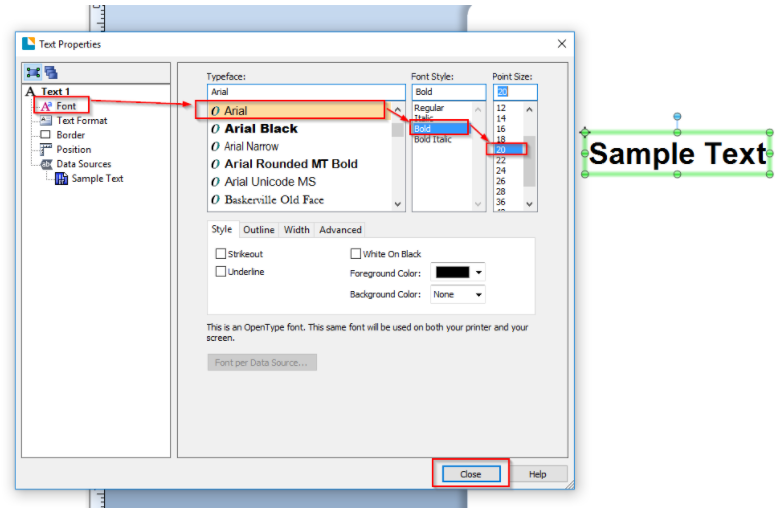
Here is a sample of how we would go around doing this:- Let's start editing the text properties to suit your needs (for example, Arial Bold 20 Point Size):
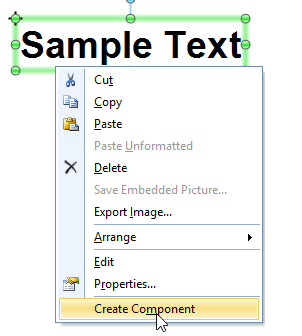
- Now, let's right-click on the text, and then click on "Create as a component":
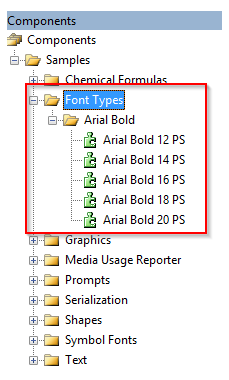
- This way we can have more than one "default" text object type, which can easily be dragged and dropped onto any label from now on; in essence, we have created our first default font; and now we can have as many as we want. We just need to drag and drop them from the Components side menu:
And that would be all! Please, feel free to reach us again if you have further questions regarding this topic, or create a new one if you'd like assistance with something entirely different.0 - Let's start editing the text properties to suit your needs (for example, Arial Bold 20 Point Size):

Bitte melden Sie sich an, um einen Kommentar zu hinterlassen.
Kommentare
1 Kommentar