Transform 1,000,000 into scientific notation 1e+6

Hello,
An integer value of 1000000 is passed from the database to the Bartender print server and we need to transform this value to 1e+6 on the label. How can this be accomplished?
Thanks,
Marina
-
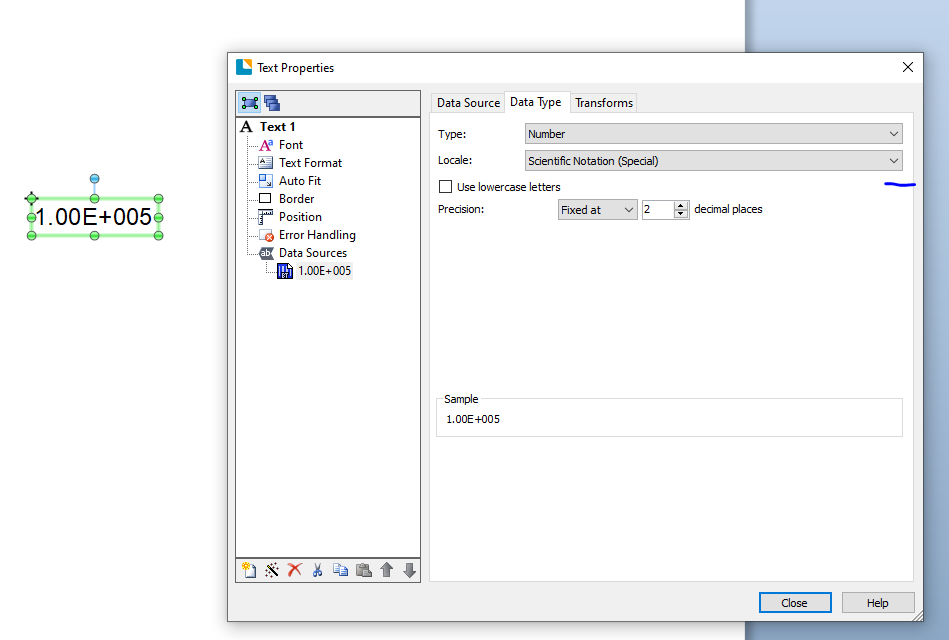
You need to change the Locale setting for the number to Scientific..
 0
0 -
Thank you so much Pete! This is definitely usable for us. Is there a way to suppress the leading 0s?
0 -
Not as far as I can see
0 -
Hello Marina! Thank you for your post.
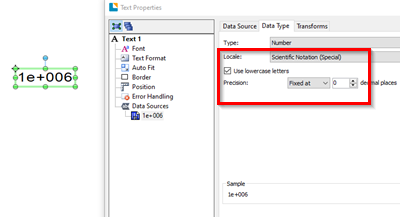
If you're going for the format of '1e+6', you would have to do a few things. First, you'd certainly want to use the 'use lowercase letters' checkbox in the same window you found the Locale option. Then, just under that, for the Precision property, set the decimal places to 0:
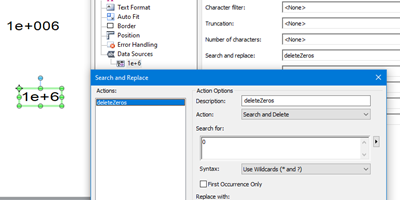
The problem is now that there are still '00's in the final piece of your data, so you're going to want to modify your object a bit more. Since your object has a single data source without much option to modify from its Transform tab, you'll instead want to rely on a secondary object, using an "Object Value" data source. For this data source, in the 'Data Type' tab, set this to 'text' so that we can use more types of Transforms.
Switch over to the Transform tab, use the Search and replace option, and set to action to Search and Delete; have it search for '0'. When you complete this, you should notice that your second object should display as "1e+6":
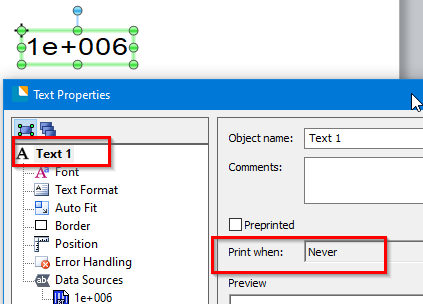
Make sure you set the first object with the original data to not print:
 0
0 -
Worked perfectly! Thank you so much for your help.
1


Bitte melden Sie sich an, um einen Kommentar zu hinterlassen.
Kommentare
5 Kommentare