Defining Network Printer in JSON for print job

Good Day,
We are attempting to configure a JSON POST to the web service to print a label. The issue is defining the network printer, I can install the printer as a local, works fine. If I attempt to define the printer as a network printer from our print server, I get errors. Below is the POST and the Result:
POST:
{
"PrinterName": "//PRINTSRV.DOMAIN.COM/IT TEST",
"boxes": "1",
"date": "07/02/2021",
"description": "10mL COC Molded Vial, Neck Up, 84 ct. Tray",
"lotNumber": "R182210119",
"partNumber": "90-0038-084",
"quantity": "14400",
"status": "QUARANTINE"
}
RESULT:
{
"Version": "1.0",
"Status": "Faulted",
"WaitStatus": "Faulted",
"Validated": true,
"Messages": [
{
"ActionName": "Print_Quality_Status",
"Level": 4,
"Text": "Print job 'Quality_Status_4X6_Label.btw' did not complete due to the following error: BarTender cannot use printer '//PRINTSRV.DOMAIN.COM/IT TEST' to design, print or export a document due to a printer setup problem. There are several possible reasons:\r\n\r\n1) The printer is not turned on or is off line. Try printing a test page from Windows.\r\n2) The printer does not exist on your system or network.\r\n3) Security settings prevent access to the printer.\r\n4) If you use a network for printing, there may be a problem with the network connection or the printer driver.\r\n5) There may not be enough memory available. Try closing files and programs you aren't using.\r\n6) The printer driver is installed incorrectly. Try reinstalling the printer driver.\r\n"
}
]
}
We can print the same document to the network printer using XML, however, the vendor requires using JSON.
Using Insomnia as a test, I do not get any errors displaying for the JSON Script.
Any assistance would be greatly appreciated.
-
Hello David,
Thank you for your message.
That error message states that the printer cannot be reached, so it is probably just a permissions issue or a 'wrong' printer name (or a combination of both). Could you check the following?:
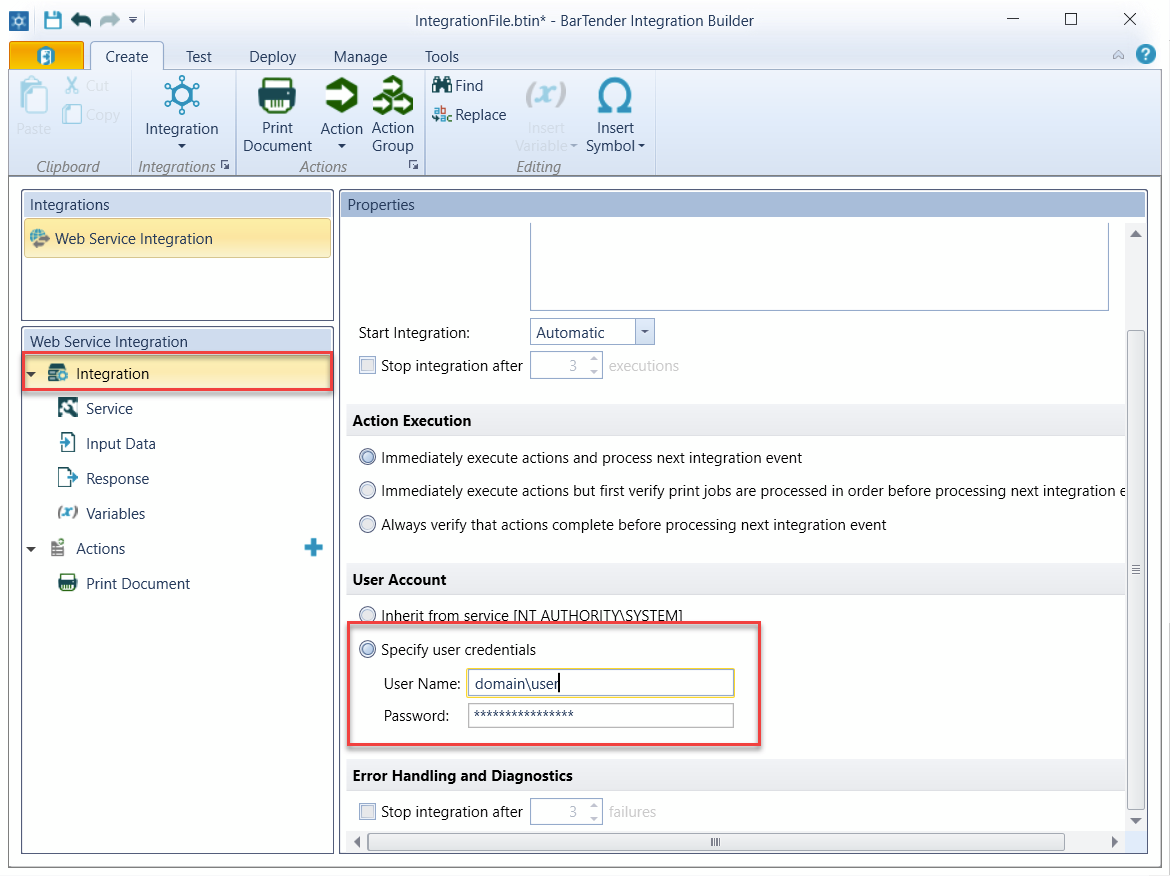
- That the integration is running with a specific user account (to access the network resource, printer)
- As the backslash is a escape character in JSON, to try something like this:
"PrinterName": "\\\\PRINTSRV.DOMAIN.COM\\IT TEST"
Greetings,
Laura
0

Bitte melden Sie sich an, um einen Kommentar zu hinterlassen.
Kommentare
1 Kommentar