Print and Apply - Removing previous print queue

We have a customer that uses a print and apply and are using a different software to print labels. We are are wanting to implement Seagull Bartender but there is a caveat. The customer will print 1000 labels to the Zebra printer. The print and apply machine will then print each label and attach it to the box. However, the user does not know ahead of time how many labels they will be printing. So they may start a new series of the same label but a different SKU. Whatever is remaining in the queue needs to be deleted, so that the new labels can be printed.
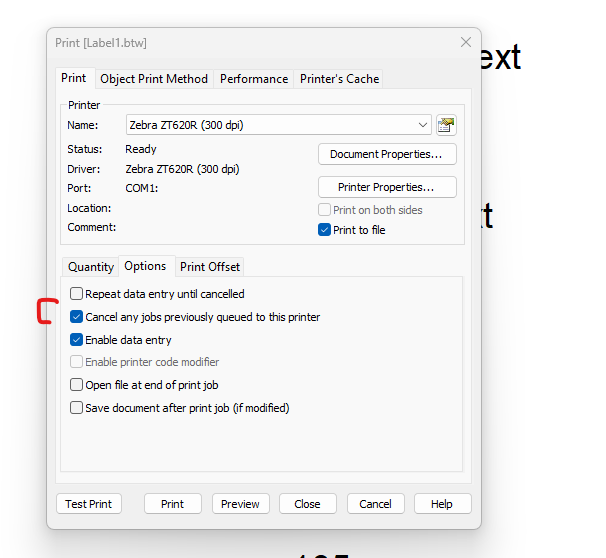
We have been doing testing using the 'Cancel any jobs previously queued to this printer' option available from the Print options. In the print driver, we added ~JA to the start job command to try to clear what was in the printer menu already. Unfortunately we are getting mixed results but the majority of them requires us to do this:
1. Turn off the printer after starting the second set of labels.
2. Turn it back on.
3. Press the Feed button.
What is happening is that the print queue says deleting after we start a new label, but it will get stuck there until we either do the above, or let them all print out. A couple of times we had this work as expected but the majority goes this way.
Is there a way to get a better result that removes all the print jobs and allows the next set of jobs to automatically get started?
We are using the newest version and release of Seagull Bartender and print drivers. The printers are networked Zebra printers.
Thank you.
-
As a suggestion, if you are using the ZDesigner driver I would suggest testing with the Seagull driver with this option on the File>Print screen enabled
 0
0

Bitte melden Sie sich an, um einen Kommentar zu hinterlassen.
Kommentare
1 Kommentar