Auto populate printer name in Print Portal no longer working after upgrade

We've just upgraded Bartender from 2019 R4 to 11.8.0.
When I created label templates previously, I set the default printer for that template by simply selecting the printer name in the Designer print dialogue and saving the file. This would then translate to our technicians seeing the printer I had selected when they went to print the template in Print Portal, with no manual selection required on their behalf.
However, since we upgraded to 11.8.0 this no longer seems to work. The printer selected in the Designer print dialogue no longer carries across to Print Portal. The default printer for all label templates is now the same ‘Zebra GK420t - ZPL’.
Is there anyway around this? I tried getting the printer name from an embedded data source in each template but when I go onto Print Portal all templates still show the same printer and not the one from the embedded data source.
Is this a bug or is there a new way of doing this?
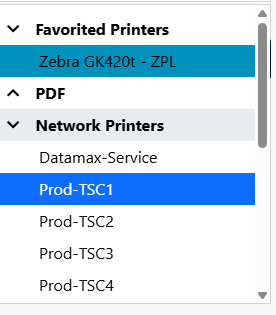
-
Following. We're also making the jump to 11.8 (from 10.4). For us, it correctly selects the printer in the interface- but when it prints it tries to print as an electronic document instead- which is problematic. We have to hit the dropdown and reselect the printer each time.
0 -
Yes, I can confirm this behavior. A PDF file is always generated, even though the correct printer is set.
We have always installed the latest updates as soon as they were released, so there have been no major version jumps. The last update was from version 11.4 to 11.8.
1 -
Kevin,
I've contacted Seagull and they are aware of this bug. They have informed me that they are working on a fix for it. They said to either downgrade Bartender to an earlier version or wait until a fix is implemented.
Thanks
1 -
Hello everyone,
it's now 2 months since the last note here. We're also facing the same problem with PDF printer at the top.Changing the default printer on the server and/or trying to suppress/deactivate it in BT Administration Console didn't work either.
The former behavior, to remember the last used Printer dos not work at all.
Going back in BT Version is no option, because we had already two mayor bugs in BT11.x, that preventing us from going live in Integration.
The Update 11.11 (19.12.2025) did not include any hint on this error to be corrected. This one now more than 1 Month old. Any news, when the announced patch will be released?
BR
Christian1


Bitte melden Sie sich an, um einen Kommentar zu hinterlassen.
Kommentare
4 Kommentare