Bartender Control characters embedded in database field

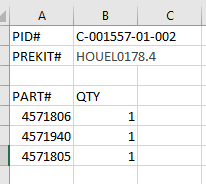
I'm trying to dynamically generate a QR Code that, when scanned, returns a miniature BOM. When I designed the QR manually with the Source set to Screen Data it scans in just how I want (second picture). But now I'm trying to implement it as a database field and Bartender is throwing up Error #3751 due to "invalid characters." Even when they're the exact same as the control characters you get when you click on them in Bartender itself.
Additionally, it seems that the field width is limited to 141 characters. Is there a way around this? Or is there an entirely different, better way I should be creating these QR codes in the first place?
Thank you

-
I am guessing the ODBC driver is not sending the <HT> commands etc incorrectly and so BarTender is not recognising them.
I would configure the QR command in a different way:
In your database I would add each variable data element as a different item/column (ie the part number in one the PID in another etc.
The QR code I would make iup off multiple sub-strings. The fixed information in the code such as the PID= and the <HT>, <CR>, part = etc I would set as Embedded Data fields making sure to use the Insert Symbol button to add the tabs etc. The variable data I would pull form the individual fields in the database each connected to a different substring, something like the image below although I have just used all text fields for this example
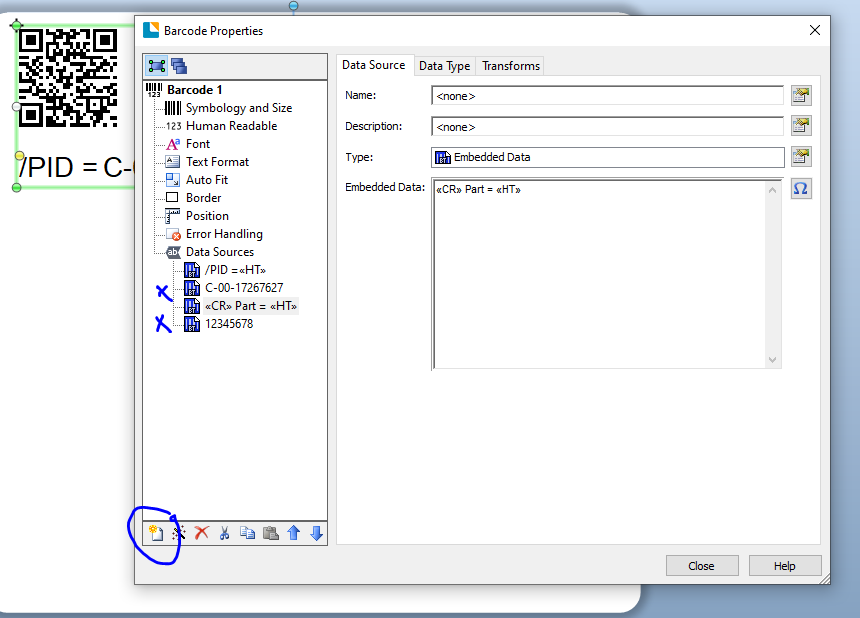
I hope this helps
0 -
Thank you for the suggestion!
After grappling with this for several hours straight last Friday, I landed upon a very similar solution.
I appreciate you taking the time to help me out~
0

Bitte melden Sie sich an, um einen Kommentar zu hinterlassen.
Kommentare
2 Kommentare