Table Selection Warning

Hello,
We are on Bartender 2019 R9.
I am having an issue using Designer. Here is how my system is setup:
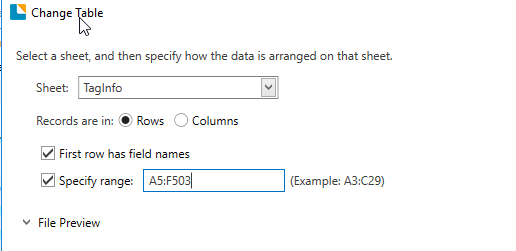
I have an excel document with one sheet named "TagInfo" and a table in the range A5:F503. The whole table is not completely filled with records, however I have that many rows incase they are needed in the future. I setup the label and made the database connection to the excel file. When adding the table in the database connection wizard, I specify that the records are in rows, and check both boxes below that ("First row has field names" and "specify range"). The range I specified is the range mentioned above, as that is where the table headers and records reside.
After clicking OK, I am able to right click the table and view the data. Everything looks good until after I close the database wizard and open it back up and go to the "Tables" tab, where I get an error message with the header "Table Selection Warning". The message says "Table 'TagInfo#A5:F503 is no longer available. Do you want to remove it?" and gives the yes/no options.
I know that the issue is revolving around the fact that I am specifying the range because I tested with a copy of the document where the table begins at A1 and there was no issue. However that does not work for this particular application because there are fields I need in the excel file above the table.
Any suggestions on what I am doing wrong here?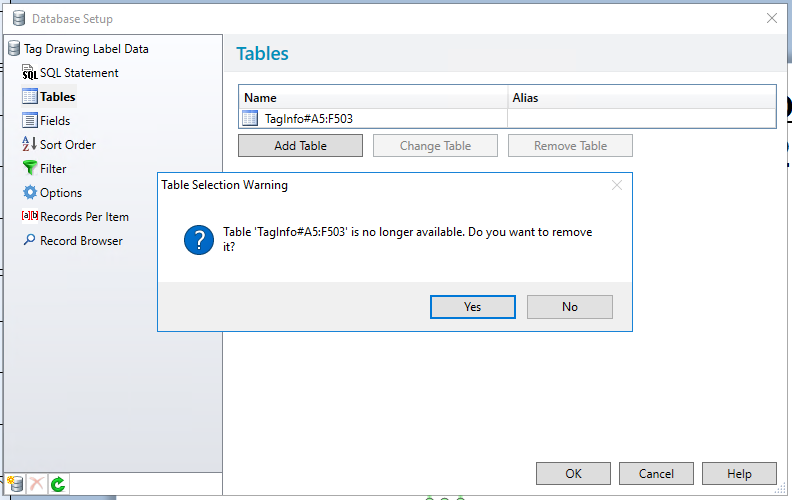
-
I have just been setting up something similar for a customer and although I did not get the same error I did receive a similar message when I tried to create the connection when I specified a column that had no data in it.
I was using a text database and I believe there are some additional column to be added and so I had set the range form A2:M1999, but had to adjust this to G1999 to get the connection to work.
Not sure if this helps
0 -
Hi Garrett, thanks for your post!
I noticed that your table name has a 'colon' symbol; normally, you can't use this character when renaming an Excel sheet (you can try this by renaming a sheet and attempting to add the colon character). If you try renaming the table to exclude this character, is your label able to retain the database connection?
I tested the name of the table and I was able to use the 'pound' character, and the connection remains in the BarTender label. Please let us know if the renaming works! It would also help if you could tell us how you produced that sheet name, it's more than likely a bug we'll want to report.
Thanks for your help!
0 -
Hi Al,
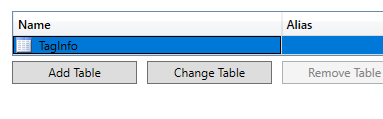
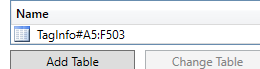
Thank you for the response. I actually do not have a colon in the table name. That symbol is needed when I specify the range for my table in the excel sheet. After I specify the range, Bartender adds that range to the Table Name field for some reason.

 0
0


Bitte melden Sie sich an, um einen Kommentar zu hinterlassen.
Kommentare
3 Kommentare