VBScript - How to get values from excel

Hi All,
I need some help with Bartender vbscripting. I would like to get values from linked excel.
Example:
Field("exxcel.Sheet1$.SN 1") ' SN1
Field("exxcel.Sheet1$.SN 2") ' SN2
Field("exxcel.Sheet1$.SN 3") ' SN3
etc,
Bartender ver: 2019 R9
Thank you,
Mark
-
You will need use EventControlledScripts

And set it to process the VB OnNewRecord.
In the script box type you command ie SN1 = and then in the column on the right double click on the appropriate Database field to create the link to that field
 0
0 -
Hi Pete Thane,
Yes, I got first SN from my excel. But I would like to get first 150 SN from my excel, and next 150, and so on.
How can I specify the line to get second value without print or trigger anything in the bartender.
ex.:
Field("exxcel.Sheet1$.SN 1") or Field("exxcel.Sheet1$.SN #1") ... I don't know.
Thank you,
0 -
Sorry do you mean you want to print the 150 records as you would not need VB for that?
0 -
150 records on one page from excel, and I click to get next 150 records and next and so on.
0 -
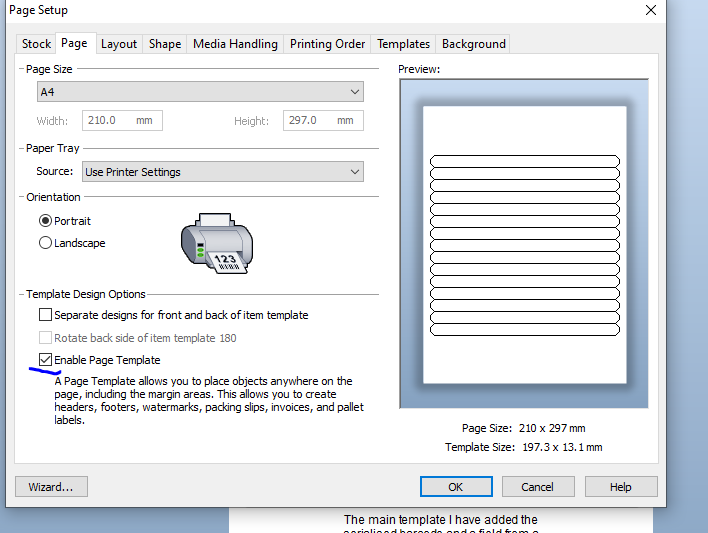
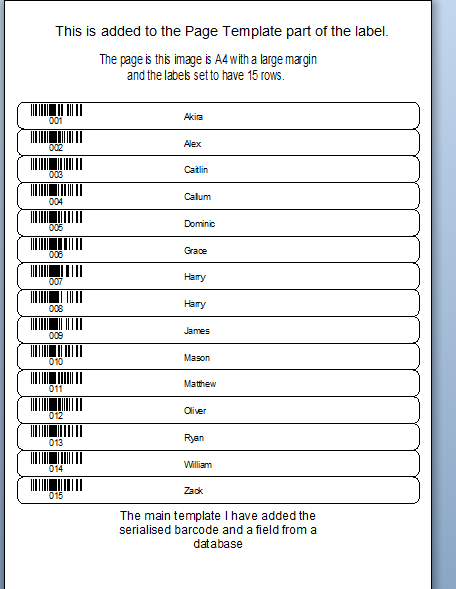
You could either use the Records Per Item in the database setup, but you would then need to reference each field in turn on the label...

However using the Page Template option maybe better, below is one I quickly mocked up
 0
0 -
Oh, thank you.
That is great!
0

Bitte melden Sie sich an, um einen Kommentar zu hinterlassen.
Kommentare
6 Kommentare