Edit the SQL STATEMENT in database setup

Hi, i want to ask can we edit the SQL Statement in database setup.. Currently the sql statament select only 3 fields so now i want to change the statement to select 4 fields. I read it online, you need to delete and create a new one in order to add it...is that the only way? I'm still new to bartender and this is my first task.
-
The simple answer is yes.If you go into the Database Connection Setup screens and click on the SQL Statement option the current statement is displayed in the box on the right (normally greyed out unless you are already using a custom statement). To create a custom statement tick the Specify a custom..... box above.
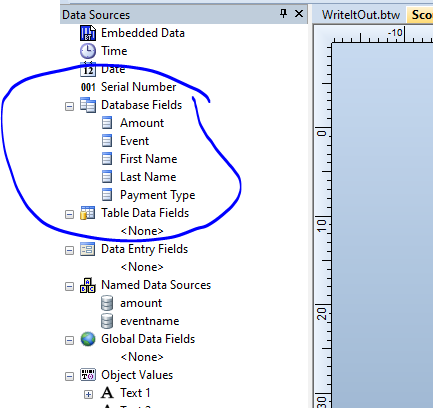
However, if the new field is in the same table you are already connected to then you may be able to access this anyway without having to change anything. All the database fields in the tables you are linked to will appear in the column on the left when you have the label open in BarTender Designer (see sample image below) and so if the field you want to connect is already there just add and edit the appropriate label field that you want to connect to this.
I hope this helps
 0
0 -
Hi Pete,
I'm trying to do something similar but in my case I want to bring in related fields from a separate table. When I do a LEFT JOIN in the SQL statement I am getting an error that says I do not have permissions to access the left table. Note that I can use both tables on their own, even with custom SQL statements. Any idea what the issue is?
Thanks in advance0


Bitte melden Sie sich an, um einen Kommentar zu hinterlassen.
Kommentare
2 Kommentare