How add a GS group separator in my GS1 128 Bar code

Hi,
i'm new at using BarTender and need some help to add a GS group separator in my barcode.
i need to add the GS before the AI (90).
thanks for your help.
here is how it set
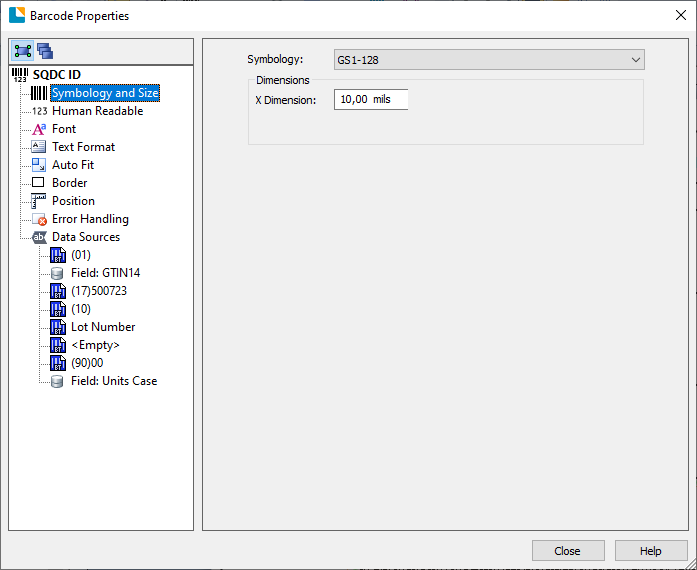
-
Just ignoring your request initially please note that your barcode has been formatted incorrectly. The brackets appear in the Human Readable only and are not encoded in the barcode data itself.
I would suggest it is advisable to use the GS1 Application Identifier Data Source Wizard but as that is normally found on the Symbology and Size tab I am guessing you are using an older version of BarTender as that option is clearly not available to you.
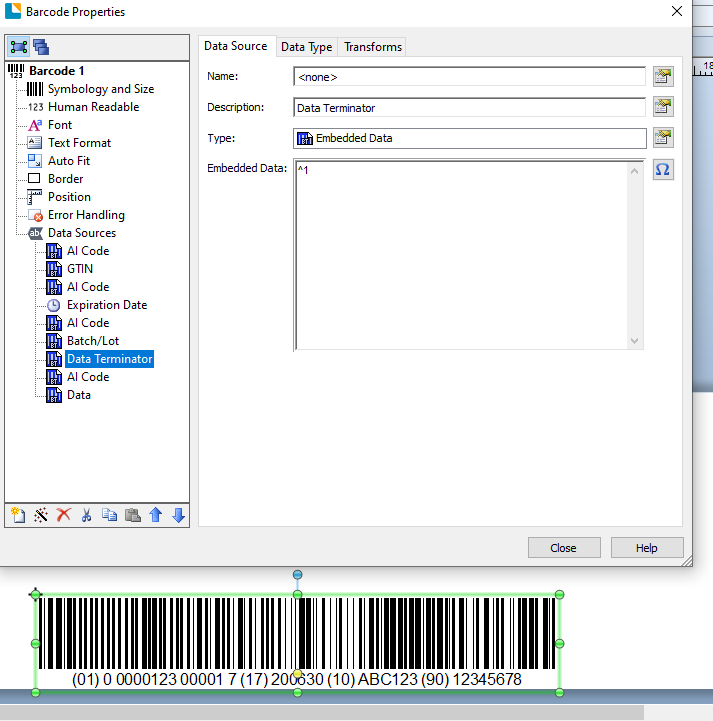
For variable length AI data fields you need to add a ^1 data terminator (Shift 6 and then the number one on a UK keyboard) so that BarTender will encode this. Below is a sample barcode properties screen without the brackets but including the Function 1 after the AI10 data string and the full barcode can be seen below for your information.
I hope this helps
 0
0 -
Hi Peter,
I know that you are an avid contributor to BARTENDER related issues.
Here is my issue and we are trying to find the solution for the past several months now -
When we download the ITF of such a barcode for the purpose of consumption in a smartform in SAP, the seperator appears as below -

Now when this data is supplied to the Intermac printer PXi6, the terminator is not recognized, I have tried with seperators \F and \x1d as well but didn't succeed.
Please advise.
Br,
Satyander
+45-51638624
0 -
Peter Thane May please have a look at the above question.
Br,
Satyander
0 -
Sorry not sure, with this, although you could try ^] for the <GS> command
0


Bitte melden Sie sich an, um einen Kommentar zu hinterlassen.
Kommentare
4 Kommentare