Qty x of y from excel

Hello!
Sorry to be a pain, but I have no knowledge of database creation, and I've been tasked with creating one for our company.
I have been able to get all the information I need to print labels from an excel sheet, the only thing holding me up is when we have more than one of something, I'd like to get "1 of 3", "2 of 3", "3 of 3" added in, but just can't quite figure out how. I was able to get "1 of 2" or "1 of 3" where 2 or 3 is the quantity listed in my excel sheet, but I can't figure out how to get "2 of 2", etc. I'm not sure if I need to change something in my database or what.
Also, when I try to print I get the error message "Not enough didgits for GTN-14." sigh.
Any help is appreciated!
-
For the 1 of 3, 2 of 3 and 3 of 3 etc configure your field on the label to be made up of 3 different substrings namely
"1", " of " and "3 "
For the 3 link this to the field in your database that contains quantity.
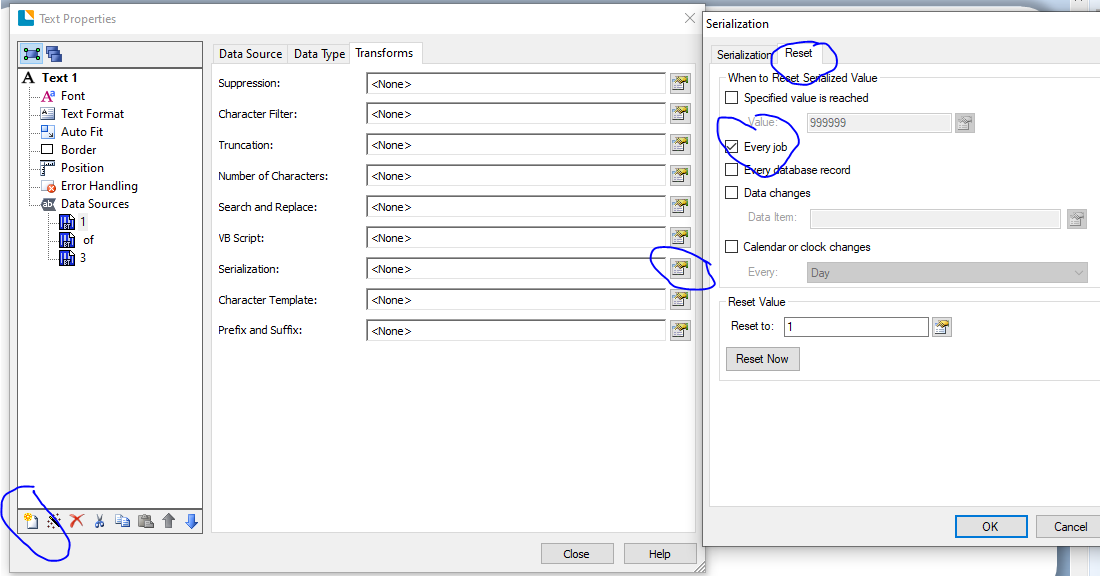
With the 1 highlighted click on the Transforms tab and click the Serialisation button and then set the field to Increment and on the Reset tab set the number to either reset each job (if they only choose 1 record at a time to print) or every Database record if they choose more than one..
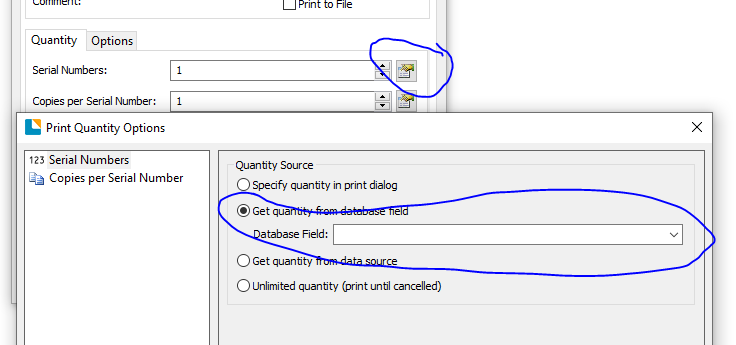
On the File>Print screen configure the number of label to print by press the Serial Numbers button and adjust the setting to get the quantity for the same field used above in your database.
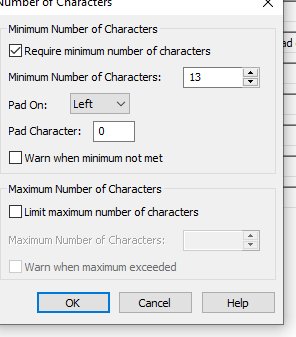
For you GTN-14 I assume your database just has the 13 digit EAN number (GTIN-13) in it, in which case you will need to use the Transforms>Number of Characters and left pad a 0 to the front of the code, plus turn the warning off:
I hope this helps.
0

Bitte melden Sie sich an, um einen Kommentar zu hinterlassen.
Kommentare
1 Kommentar