Bartender 16 not working with access database reading query using more than 1 linked table

With Bartender 10 I would routinely use one access database query to pull all of the data for a label.
Often this one query would contain data from other linked databases. (other access databases or a SQL database)
Now with 16 and I believe 19 as soon as I use more than one linked table in my query the data cannot be read or only some of it is read.
Is there a fix for this, that will allow me to use my existing access database queries?
I have installed the microsoft access database engine which solved some of the connectivity issues.
-
I think there mist be an issue with your configuration as I have configured a number of customers databases with multiple tables, joins and queries (now filters).
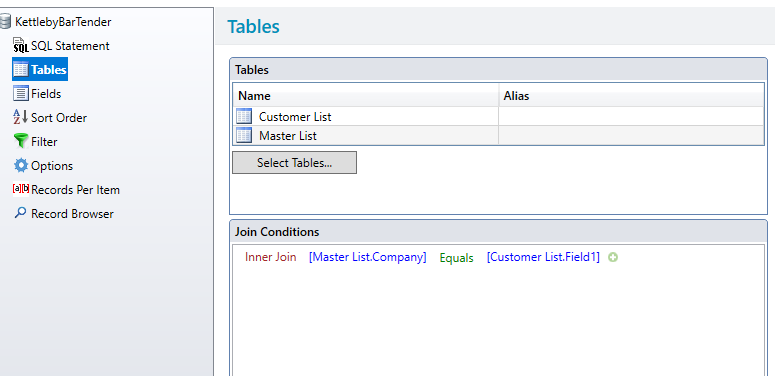
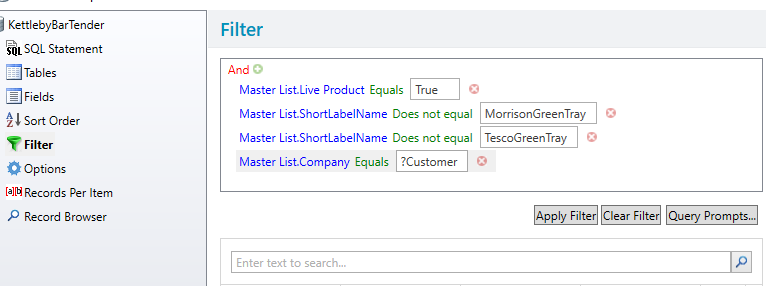
These are a couple of screenshots for a recent install which used two Access tables joined together which may give you some pointers hopefully as I know the Database Setup screens are different in 2016/2019 than v10.0
 0
0 -
Did any of those involve reading an access database query that it's self contain 2 or more linked tables?
I do the bulk of the query writing in access and use a query prompt for the user to select the correct record.
0 -
No all the queries and links were performed inside BarTender itself and so you probably need to replicate these in 2016/19.
Another option, would be to control everything from Access and use some of the Automation features (assuming you are not using Professional edition) to produce the appropriate label. Such as running your query and then creating a "trigger" file with the data and/or BarTender specific commands in it (such as the label format, printer etc.) and create and deploy an Integration in Integration Builder (similar to Commander from v10 but now with more advanced options) that waits for the trigger file and then prints the labels.
0

Bitte melden Sie sich an, um einen Kommentar zu hinterlassen.
Kommentare
3 Kommentare