Multi-Select List Box or Check Box or Radio Button List

I have checked and noticed that with List Box or Check Box or Radio Button List we can only choose one option.
I need to select more than one options each time - how we can do that ?
-
That is not possible directly from within BarTender as far as I am aware.
You link these options to only one sub-string and there can only be one direct source to a sub-string and so there is not an option to select multiples from a check box entry etc..
As an alternative you would need to make your data field made up of multiple sub-strings and then link each one of these to a different input source
0 -
Thanks for the reply.
Can you please give me an example of the way you suggest ?
0 -
Hopefully this helps.
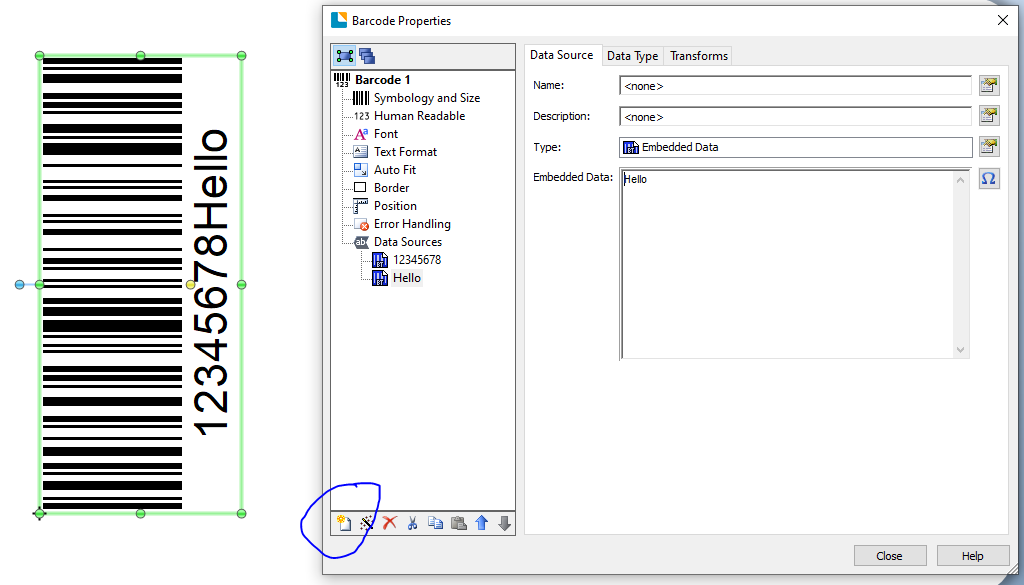
The image show a Code128 barcode made up of two separate substrings, which means the data can come from two different sources, using the ringed button to add the new substrings
 0
0 -
Thanks for the reply.
Two questions:
1. At form, how we choose the input of that Code128 to be multi-select ?
2. When we select "Hello", where we can choose what to be printed ?
0 -
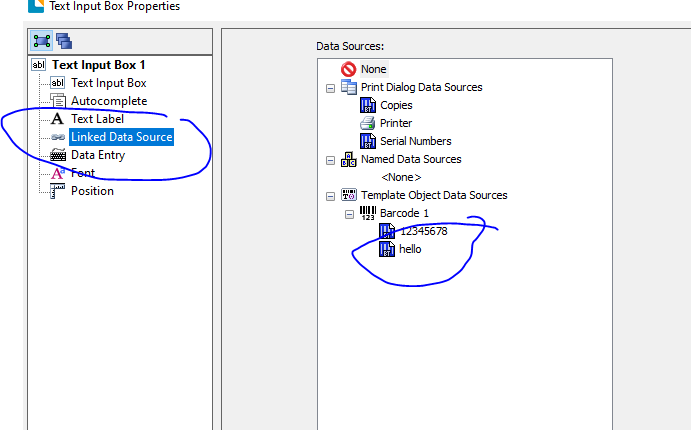
On your data entry form you use the Linked Data Source to choose which substring the entry relates to . The image below is for a text input box but the saem is true fro radio buttons, drop down lists etc as you always need to tell BarTender what the input connects to on the label
 0
0

Bitte melden Sie sich an, um einen Kommentar zu hinterlassen.
Kommentare
5 Kommentare