Error #3775

Every time I use print station with an active record picker I get the following message once I have printed a label. Error #3775.
I'm using a Zebra GK420d and printing from an excel linked database.
-
One of the fields on the label is probably off the edge of the label and so needs adjusting. This is just a warning message,
0 -
I am getting this error message even when there are no fields coming anywhere near the edge of the label. It seems to only happen when I'm using the new fonts that I recently installed AND when I reduce the font size down from 12 to anything smaller. If I reduce the size on any of the stock fonts then I don't get the error message...it's only when I mess with the font size while using these newer fonts. Any ideas of how to solve this issue with these new fonts when I reduce the sizes down?
0 -
As mentioned above you get that when one of the fields is on or over the edge of the label. If the labels are printing correctly you could just disable the warning (Administer>Application Message Setup menu item in Designer). It is best to fix the issue but if you cannot diagnose you could adjust the settings to those below but just make sure you monitor the printed output.
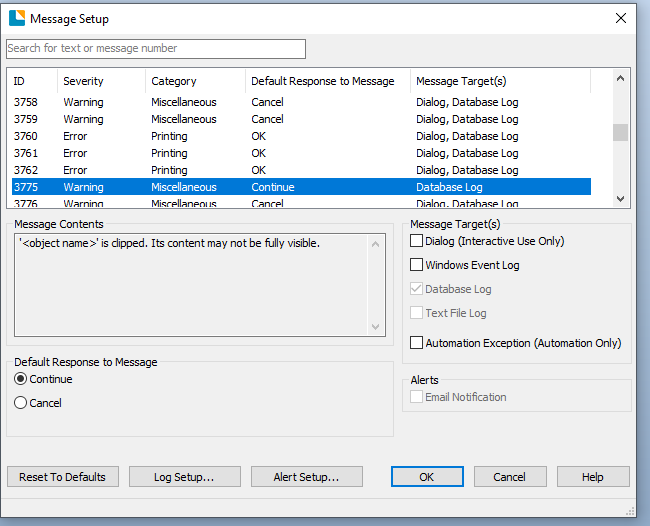
I believe this error is connected to this setting in the error handling too
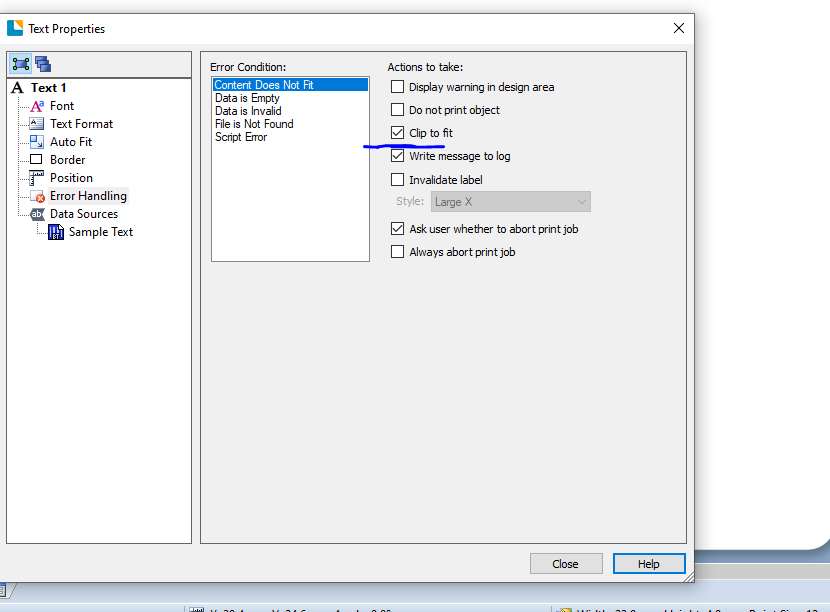 1
1 -
I also encountered this issue where all my objects were within the boundaries and I received a clipping error. What I discovered is that I was using a base layer image that stretched across the entire label. The image is square and my label stock has rounded edges which I incorporated into the design under Page Setup > Shape > Template Shape. I decided to turn this from rounded rectangle to just rectangle and the issue was resolved. It seems the corners of my square image was sticking out on the corners of the rounded template.
0


Bitte melden Sie sich an, um einen Kommentar zu hinterlassen.
Kommentare
4 Kommentare