Printing item number/quantities from excel and data being pulled from the data base.

I have my label all setup to pull data from the database, i have been using this for a long time now with no problems. I use this particular label to put our internal item codes on all the product that comes into the storeroom. So when i click print i will type in our internal part number, and it will fetch all the relevant data from the data base then it will ask for how many i want.
What i want to try and do is have a list(excel sheet) with the internal numbers and quantities i want to print and for it to pull the data from our database, so i dont have to manual enter in each number.
-
If this number is in a column in the same list:
- Go to the File>Print screen
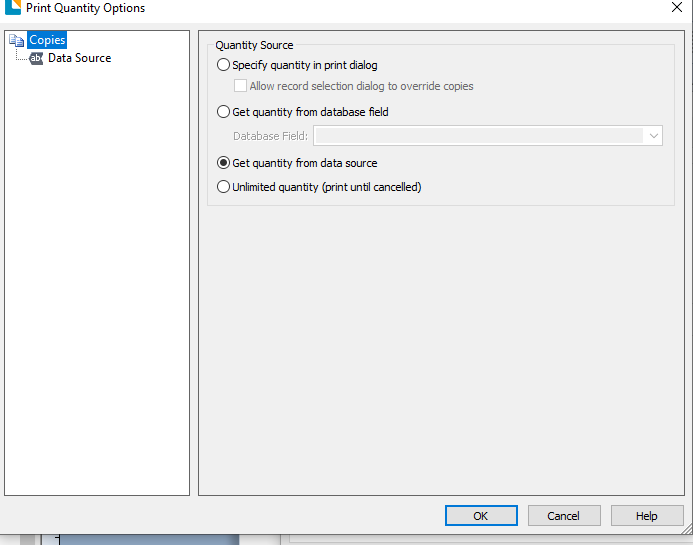
- Click on the button to the right of the Copies entry box
- Change the source to "Get Quantity from Data Source option"
- Click on Data Source in the left hand column and then configure this like a normal label field to a Database and then choose the filed that contains the quantity and then OK/Close to come out of this and save the label
If the quantity is in a separate database you will need to add this table to the label and create a Join between the tables. For this the data in a certain column in one table must be the same in a column in the other table and you need to link these together. BarTender will open (or prompt you to open) the join window try and determine which fields link up but you may need to manually adjust this if it does not detect the correct ones.
Once the join is created the process to select the table and field to use is identical to that outlined above.
I hope this helps
0 -
Hello, im having the same issue and i followed this steps, but it keeps printing what says in embedded data. Im using a brother td-4420dn. Another thing, if i use a pdf printer just to check, it prints what the DDBB (excel) says. Perhaps its something with the printer configuration??
Regards.
0 -
Have you got full permissions/rights to the printer as I wonder if the copies dialog setting is blocked off for some reason?
0


Bitte melden Sie sich an, um einen Kommentar zu hinterlassen.
Kommentare
3 Kommentare