Total qty using VB script

Hi all,
I am really not familiar and used to VB scripting. I got create a label, and need to add qty at LOT 1 and LOT 2 (if there is value) and make total qty appear at QTY bar code.
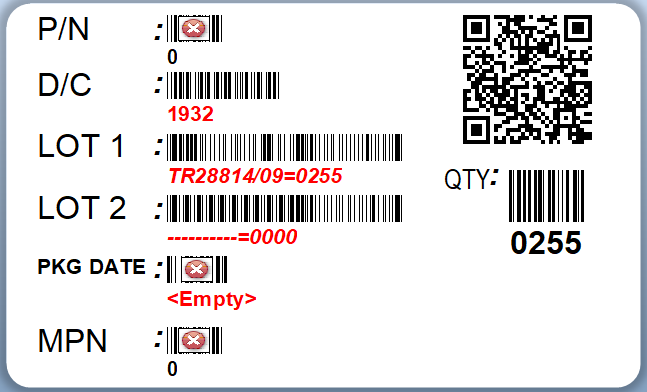
Please advise.
Thank you
-
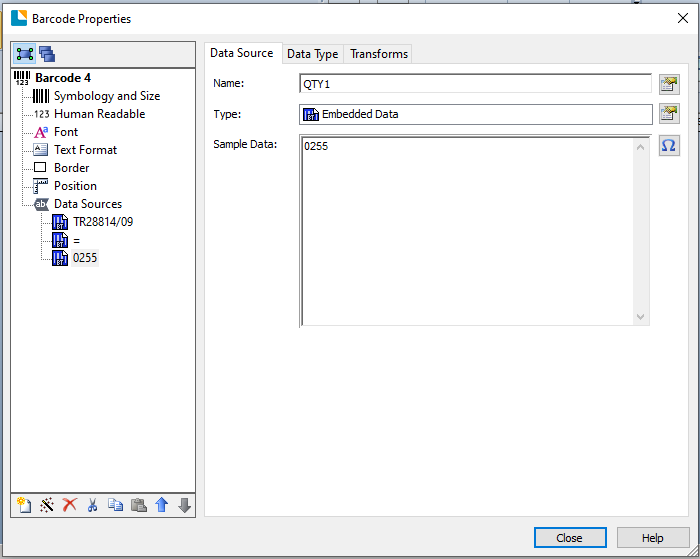
I am guessing as you Named the 0255 field QTY1 that the other field is QTY2 which will make things easier.
As the data is variable and this is not a Database sourced field assume it is entered at print time on a Data Entry Form.
Go into the Properties of your total barcode and change the source to VB Script and make it an Event Controlled Script type and then press the button to edit the script.
In the OnAutoSelected event change the value to whatever on screen default you want, eg 99 by typing in the middle mox
Value = "99"
In the column on the left scroll down and select OnPostPrompt and then in the central box type in
Value = CInt( <click on QTY1 in column on right > ) + CInt( < click on QTY2 in column on right> )
which should look like this
Value = Int(Format.NamedSubStrings("QTY1").Value) + Int(Format.NamedSubStrings("QTY2").Value)
and then Close to come out of the VB Edit window.
If the total filed should be 4 characters long then use the Transforms>Number of Characters option to amend this leaving the default padding with leading 0
I hope this helps
Pete
-1

Bitte melden Sie sich an, um einen Kommentar zu hinterlassen.
Kommentare
1 Kommentar