help!!!!

how can I make all data matrix the same size????
-
auto size function in the data-matrix properties box.
-1 -
Thanks I understand, I still have the same problem, I made your recommendation and the data-matrix sizes changed, however none is the same, you know... how I can adjust them? you will see that the data-matrix is 0.34 mm is a standard.
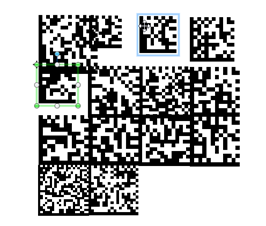 This is the example. Can you Help me about this tem!!! :(-1
 -
Data matrix size will change based on how much information you are putting in it and the DPI of the printer you are sending the labels to. In the barcode properties box, you can set the max / min sizes that the datamatrix can be.
0 -
Your bar code changes size because they have different data lengths. I suggest you determine the maximum length for your label.
One your barcode data source look for the transformation tab. On the transformation tab, select "Number of Characters".
On the Number of Characters dialog, set the minimum number of characters and add a Pad Character (such as a space).
0 -
Ok, thanks, I will try to do and I appreciate your support, but ..
in this moment buy a printer to make a label and it are to arrived.
I have a software test and I think it has to many restrictions.
¿You think that may be why I can't adjust the data-matrix?0 -
No i don't believe its the software test, we have printed 2million labels to date using Bartender. It just takes some practice, visit YouTube for tutorials from them on barcoding and setting sizes.
0 -
You should be able to do as I suggest with the Free version of Bartender.
0 -
Thanks !!!
could be.. but is difficult ...
I think need more practice. I have two weeks to try to do sticker and I really thanks for your help!!!
I send many greetings from Toluca in Mexico0


Bitte melden Sie sich an, um einen Kommentar zu hinterlassen.
Kommentare
8 Kommentare