No Records Found/Multi Database/VB Script but is on screen

Hello
Bartender/Commander 10.1 SR3 on 2008 R2. Been using and working for years now. We drop .dd (txt) files into a folder and Commander picks it up and sends to printer. Recently had request to add a field on label based off a value passed to the label from the .dd file. The value for new field is in a SQL database, so the label would have to look it up when executed.
First attempt: Created additional Database Connection using wizard, Microsoft SQL Server. Joined text file database (the .dd file) to the appropriate SQL table (and found out only 1 join can be made, and has to be INNER, but no big deal). Using test file in designer mode, label took ~4 minutes to preview, but correct data was there. Test with preview mode, but bartender just froze. Must be timeout issue, not surprised, table has a million records. But data was on screen, so looks good.
Second attempt: Created temp table containing one record to prove proof of concept. Designer comes back immediately with correct data on label. Test using with preview mode and got No Records Found. Dropped into Commander and got No Records Found log entry.
Third attempt: Created local text file containing target data so no SQL connection over network. Two records in text file. Created Database Connection on Text File, joined on appropriate field. Test file worked using both records in designer mode. Print Preview again showed No Records Found. Same with Commander of course
Fourth attempt: started over. Added text field and then used Multi Line VB script to create OLEDB connection and retrieve required data from SQL table. After getting the code right, it works quickly, beautifully...in designer mode. Surely this will work now! No Records Found.
Every time, the correct retrieved data has been on the screen. Every time, Print Preview and Commander has returned No Records Found. What am I missing?
Thanks in advance for any help on this.
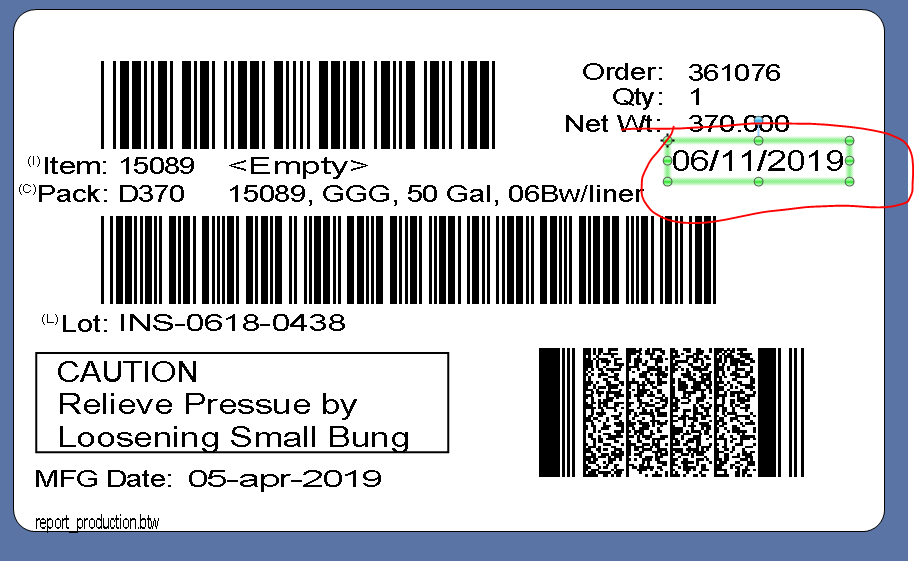
Don't know if this will help or if the screenshot can be included in this post, but below is a picture of the label with the correctly retrieved data circled.
Chris
-
Not sure but a couple of things you could try are upgrade to SR4 as that was the last version of 10.1 and if it is as a result of known bug it could have been fixed there.
Commander uses a Windows system account as default and so may not have enough permissions to run the query into the other database and so you could try adjusting the User account used in the BarTender Command Handler in Commander. I cant remember the exact name now as I no longer have access to 10.1 but I seem to recall there is a button which takes you through to a setup screen. Isnt there also a screen in Commander for ODBC/database connections too and setting those up?
0 -
Peter
Thanks for the comment. I will see if the installation can be updated, that is out of my hands though.
As far as Commander goes, that is not the issue, and I should have left that part out. In Bartender, in the label design view, the data correctly shows up. But when I try to print preview in Bartender, that is where I get the message 'No Records Found'. That would have summed up the issue right there. I also get a 'No Records Found' log entry when i do try to run it through commander.
It really doesn't make any sense, and I just keep thinking that I must be missing something very obvious. Why would it work in design view but not print preview?
0 -
You may want to try going back a step even further and create a brand new label, with just a couple of fields on and try linking those up to the two databases with a join and see if that works.
0

Bitte melden Sie sich an, um einen Kommentar zu hinterlassen.
Kommentare
3 Kommentare