Designing composite label (i.e. shared assets)

I asked a specific version of this over a year ago - it wasn't possible then, I'm hoping if I ask another way someone may have an idea. I reluctant to accept this isn't possible because it seems like such a useful feature, IMO.
Question: How do you share a common piece of data and formatting across many label formats? For example company address, logo and slogan.
I hope the following diagram I made will make it clear what I'm after:
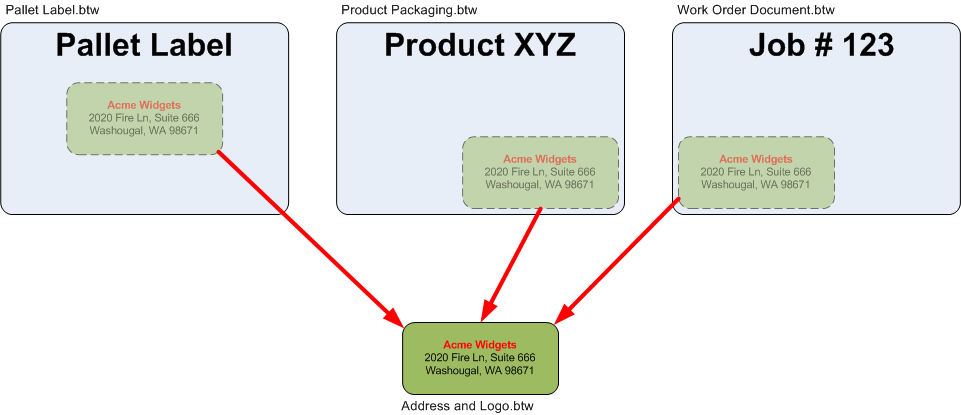
In case it's not clear:
- Address and Logo.btw is shared with the other 3 labels.
- The other 3 have a "linked" version of the BTW file added to their format.
- If my organization decides it wants to change the address and logo we need only to update "Address and Logo.btw" and the other files will pick up the change when they are printed next.
Database use is half the solution: data. I also want to share formatting.
Please tell me there is a way to do this?
-
Depending on which version of BarTender you are running you could use Global Data Fields for text items but what maybe simpler is if you create the address as an image file itself and on each label template add an image object but make them an External Picture File item linked to your address logo image. At print-time BarTender will load in this external logo onto the label each time and so pick up any changes.
The logo would need to be saved in a shared folder that all the users have rights to access and if a number of people in your organisation design labels etc, you could tweak the Administration Console>File Locations>Picture setting to this shared folder so by default all the users will be linked to the same folder for image files to be used
What could be useful is to create a label in BarTender than is the size of the address box you want to use. Whenever the address changes type the info into this "label" but instead of printing it use the File>Export Image option to create the new address image file but calling it the same name as the old image. That way you know it will always be the same size that you need it to be on your printed labels and so can set the size parameter for the image item on the label to a fixed 100%
0 -
Just carrying on from the above where databases are in use, if the address logos are dependent on a database parameter, i.e. the address/logos are your customers and not yours or you have a number of different logos that your company uses (maybe for different divisions of the business) then this can also be handled using the External Picture File method as long as the name of the image either matches a value in one of the fields in the database or a different Data Source on the label and you adjust the label image settings accordingly.
0

Bitte melden Sie sich an, um einen Kommentar zu hinterlassen.
Kommentare
2 Kommentare