Bartender 2019 R6 Integration is using wrong printer

I created an integration file as a “bridge” between my .NET Core WebApp and Bartender 2019. The communication between Bartender and my .NET Core application is configured using JSON.
The Bartender integration has been tested successfully, and my Admin Console is able to register the print task from the .NET Core WebApp. Unfortunately, the wrong printer is selected by default, so no label is printed—even though the client is connected to the correct printer and could print manually if the print task were executed.
What should I try next and is my approach .NET Core → Integration File/JSON → Bartender actually feasible?
Pictures:
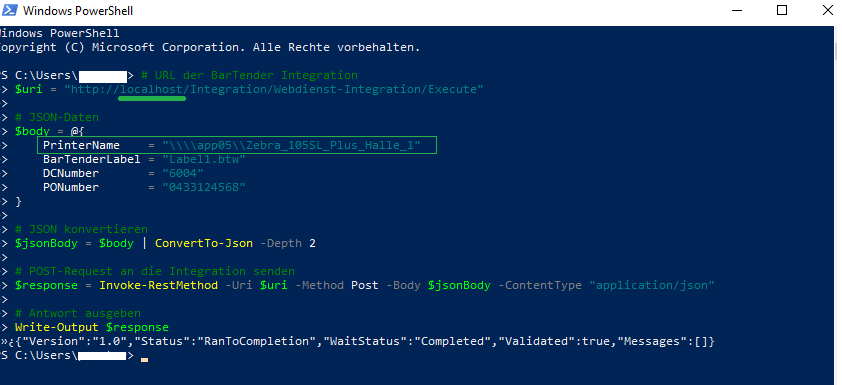
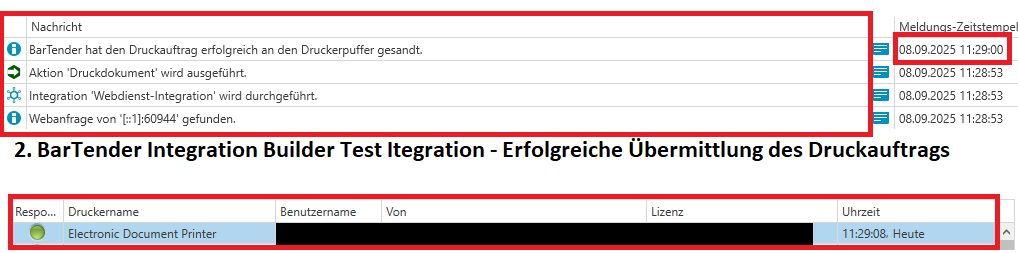
-
I wonder if this is a permissions issue and the account that is running the Integration does not have enough right to connect and control the networked/remote printer and so the Printer Redirection in Administration Console is kicking and sending the printer to the device set as the redirect.
Try adjusting the the “user” account that is running the BarTender Print Scheduler service from the default, local system account, to a user account that has full permissions to open and access network devices and locations
0

Bitte melden Sie sich an, um einen Kommentar zu hinterlassen.
Kommentare
1 Kommentar