MYSQL Database Setup Wizard: Missing Database Name

Hello Community,
I'm currently setting up a MySQL database connection for a BarTender template and have encountered an issue I hope someone can help with.
🔧 Background:
We have two servers:
-
Live:
abcd.com -
UAT:
dev.abcd.com
Both servers:
- Use the same username and password
- Run on the same port
- Contain identical databases and tables
The UAT server is essentially a copy of the Live server. Most of our existing BarTender templates are connected to the Live server. However, the template I'm working on uses a different logic and is intended to connect to the UAT server.
❗ The Issue:
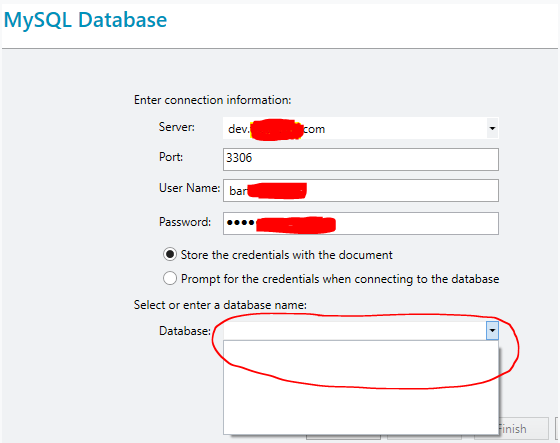
When I attempt to connect the template to the UAT server, the database name field goes blank, and I can't proceed. Strangely, if I switch the server name back to the Live server, the database name reappears and everything works fine.
The only difference between the two server names is the prefix:
- Live:
abcd.com - UAT:
dev.abcd.com
🧪 Troubleshooting Steps I've Tried:
- Restarted my computer
- Restarted BarTender System Services
- Restarted SQL Server and SQL Server Agent
- Tried connecting using the server’s IP address
- Ensured my public IP is whitelisted on the UAT server
Unfortunately, none of these steps resolved the issue.
🧩 Additional Notes:
I've seen similar questions posted online, but none had clear solutions—many seemed to abandon the attempt or switch to a different database.
🙏 Request:
If anyone has encountered this issue or has insight into why the database name field might not populate when connecting to the UAT server, I’d greatly appreciate your guidance.
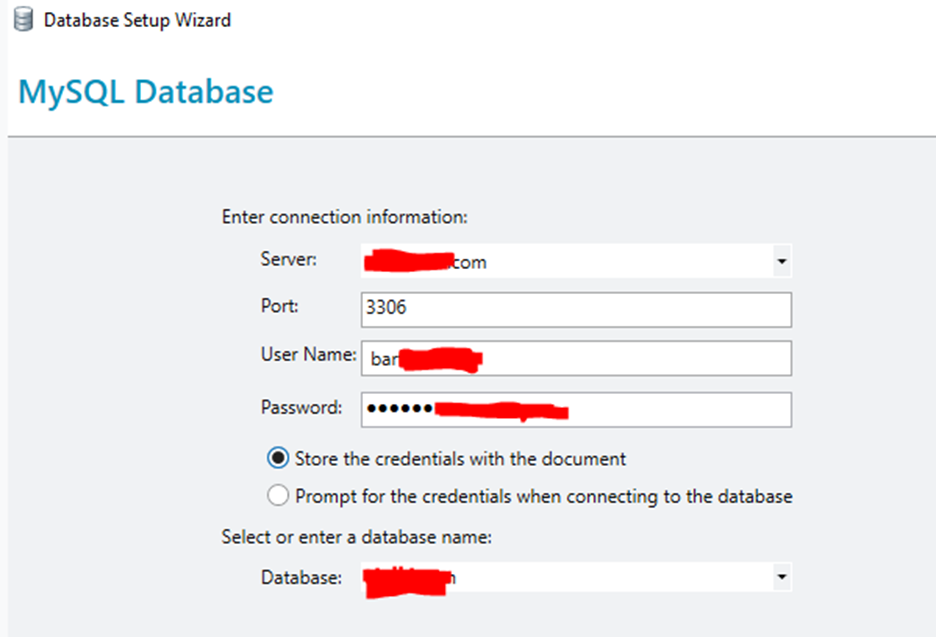
I've attached screenshots showing the Live and UAT database setup. In the second image (UAT), the red circle highlights the missing database name.
Thanks in advance for your help!
Live Server Setup:
UAT Server Setup:
-
I wonder if it is something to do with different full field names due to the different database names/paths.
You could try adjusting your dev connection to a Named Database connection and this will adjust all the links in the label etc.
Then open Administration Console >. Database Connections and then you can adjust the link to the database without adjusting the name, as long as both databases are identical in format etc.
The other issue could possibly be a rights issue accessing the location to the new database, depending on how you are printing and you may need to adjust the “user” account that runs the BarTender Print Scheduler service from the Local System account to one that has full permissions for the network folder.
0 -
Hi Peter
Thanks for you reply.
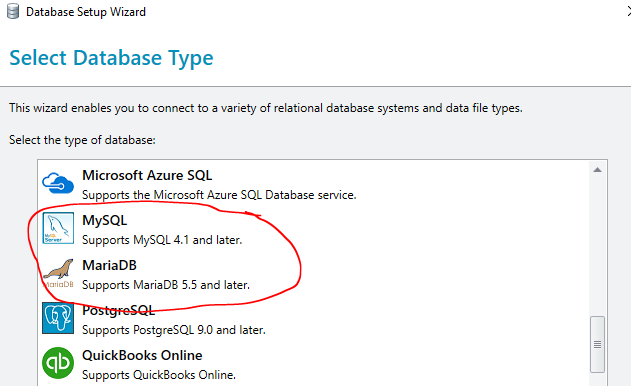
Is there a way to confirm the exact version of MySQL or MariaDB that BarTender 2022 R4 is compatible with or uses internally? We're currently running MariaDB version 15 on both our Live and Dev servers, but we’re still unable to resolve the issue we’re facing. As a temporary workaround, we’ve pointed our new web server to the old database server while we continue troubleshooting. Could the issue possibly be related to an outdated ODBC driver?
 0
0 -
It could be, but I would expect you would get a message saying that you cant connect up to the database as it is an old ODBC and that was the issue.
If you ignore your existing labels for now, can you create and link to a brand new label on the live system?
0 -
Hi Peter,
Thank you for your response.
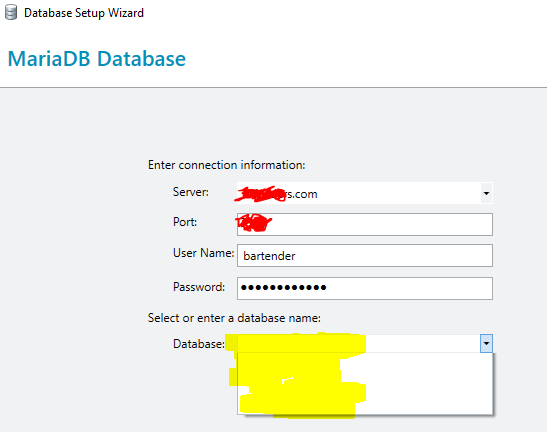
I followed your suggestion and attempted to create a new integration and connect to the database, but unfortunately, the issue persists. The Database Name selection field still appears empty in the Bartender Database Setup Wizard.
We have a new database server ready to be deployed to improve reliability and performance across our operations. However, due to Bartender not recognizing the database name, we are currently forced to revert to our older database server. While the old server is functional, it lacks the efficiency and robustness of the new setup.
Below are the details of the new database type I’m trying to connect to:
Ver 15.1 Distrib 10.11.13-MariaDB, for debian-linux-gnu (x86_64)
This issue also occurs when I attempt to connect using MySQL as the database type, not just MariaDB.
Could you please help find me an answer why this might be happening and advise on how we can resolve it?
0 -
 0
0 -
Sorry I haven't got access to MariaDB environment to check, but usually when I have seen this before where the databases are missing it tends to be due to an issue with how the server has been specified.
You may need to raise a ticket with Seagull's Technical Support team for assistance with this
0

Bitte melden Sie sich an, um einen Kommentar zu hinterlassen.
Kommentare
6 Kommentare