Problem with Images Crashing the Form

Hi,
Having problems in Designer with embedding images on the form of a label template. When I attempt to embed a image regardless of format i.e. *.bmp, *.jpg, *.png.
The form throws an error as per screenshot
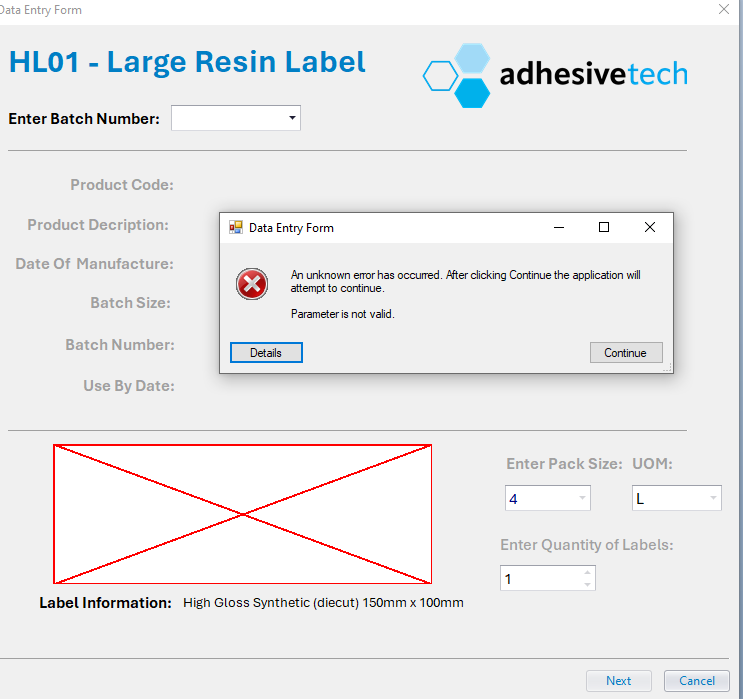
Parameter is not valid.
at System.Drawing.Bitmap..ctor(Int32 width, Int32 height, Graphics g)
at Seagull.Forms.Controls.DataEntryControlUtility.DrawSiblingsOnBackground(Control control, Graphics graphics)
at Seagull.Forms.Controls.DataEntryStaticImage.OnPaintBackground(PaintEventArgs e)
at System.Windows.Forms.Control.PaintWithErrorHandling(PaintEventArgs e, Int16 layer)
at System.Windows.Forms.Control.WmPaint(Message& m)
at System.Windows.Forms.Control.WndProc(Message& m)
at System.Windows.Forms.Control.ControlNativeWindow.OnMessage(Message& m)
at System.Windows.Forms.Control.ControlNativeWindow.WndProc(Message& m)
at System.Windows.Forms.NativeWindow.Callback(IntPtr hWnd, Int32 msg, IntPtr wparam, IntPtr lparam)
Is there any solution to this problem.
Started happening on templates that last week were displaying fine with the embedded image.
-
Not sure but it looks like something has got corrupted somewhere.
Have you tried deleting the image and saving and closing BarTender, then reopening it and adding a graphic back on?
0 -
Hi,
Have tried everything. Used different image file formats *.bmp, *.jpg, *.png. Reduced image size and quality. Once the error starts it seems the label file is indefinitely corrupted and only solution appears to be to modify a non-corrupted one or recover a backup.
Its a nasty bug that breaks labels.......
I tried your suggestion above and it failed again with same error.
It might be a permissions problem with Bartender as we store in out files on a local LAN with only a budget NAS Box. I'm wonder whether Bartender cannot access the file due permissions. But strange how everything was working fine and then its not.
On label where it was working to trigger the error i simply moved the image a couple pixel point to a direction and the error occurs.
Using Bartender Designer 32 bit version....
Program: BarTender Designer 2021 R9
License: Automation Edition (3 Printers)
Version: 11.2/186892 (32-bit)
OS: Windows 10 Pro x86 build 19045Going to migrate the template to x64 bit version using Designer 2022 format and see if the problem ressolves.
0 -
You could check if it is permissions if you move the images to a local folder rather than the network folder to test with.
0

Bitte melden Sie sich an, um einen Kommentar zu hinterlassen.
Kommentare
3 Kommentare