Optimizing Printer Properties And Document Properties

Hi All, Changing from software by others to Bartender. Removed old driver and installed Seagull driver. While re-creating labels from blank, it seems that I don't have all of the options available (ie contrast, print speed) that I used to have with old driver. Result is not as crisp and dark printing as before. Changes to speed and contrast made manually at the printer itself don't seem to make changes. Should I try old drivers by others with Bartender? Please point me down the correct path. Enterprise Automation Vers.10.00 printing on Monarch 9855. Thanks for your help.
-
In BarTender, with the document loaded, select the "File>Print" menu item to open the Print dialog and click the "Document Properties" to open the printing preferences of this document. Make the changes you want close and save. Note that the print settings are stored and embedded as part of the document file.
0 -
OK, got it. thanks for the direction.
0 -
Whatever changes that I made in document properties is not taking in effect. Once it is reopened ,it is back to old settings. Any idea what will be the reason.
I was changing printer settings to portraite 180degree but it is at 0 degree portraite when I take a print or when reopen the doc.
0 -
Are you saving the label after you make the change?
Are you only changing it in the label and not in the driver settings too?
If neither of those work you could all ways use the Edit>Select All and the Rotate 180 degrees option on the Arrange toolbar (or Arrange menu and rotate option) and then save the label with this change.
0 -
I know this is a very old post but I am having a similar issue. When I update print speed and darkness and or orientation, it doesnt always save even though I have saved the template. Also, it doesnt seem to save to the label template and depends on the printer because some printers will be updated by others wont. Is there a way to make this controlled at the software/template level not based on the printer? Also what do you mean driver settings? Im sorry Im not too well rounded in the IT or basic computer concepts.
0 -
If the printer settings are set to this then the label will use whatever the front panel settings are for the printer
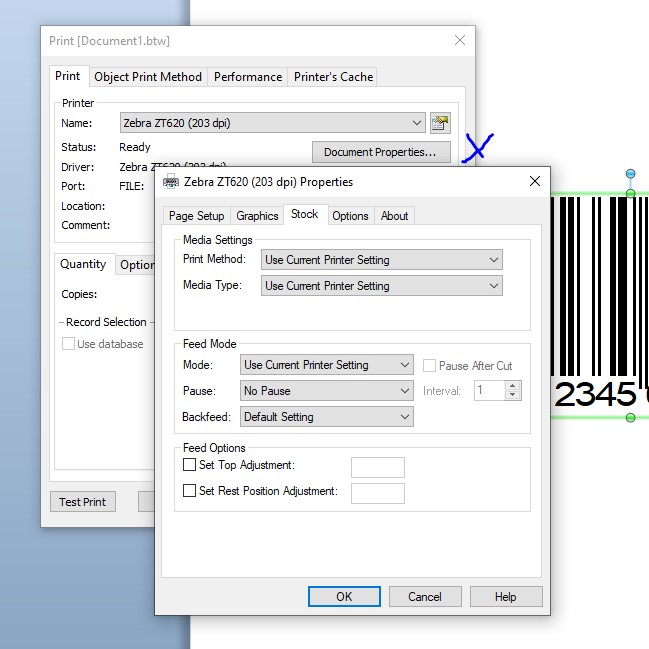
You could also try adjusting the Performance tab to Use settings for this document only and then resave it and see what that does.
0


Bitte melden Sie sich an, um einen Kommentar zu hinterlassen.
Kommentare
6 Kommentare