Date Conversion (Yyyy-Mm-Dd To Mmyy)

I'm starting to catch on to this VB Scripting thing, but this date conversion is giving me some trouble. There's got to be a way to do it.
On my label I show an expiration date formatted as YYYY-MM-DD. I also need to include the same date in my HIBC barcode as MMYY. I'd prefer to only have one date picker control.
In my barcode I chose VB Script as the data source type, but I'm having trouble finding a script to convert the date format from the named data source (ExpirationDate).
I could create three text controls on my Data Entry Form and combine them however I need for each location the date is used, but I really like the date picker function.
Help?
-
It would be a lot easier to change the data type in the barcode to 'object value', point it to the text object that you're using the date picker with, change the data type to 'date' and select the appropriate type.
In VB, create a sharename for the date object (I called it 'test') and use a script like this:
Dim MonthValueMonthValue = Month(Format.NamedSubStrings("test").Value)if MonthValue < 10 then MonthValue = 0 & MonthValueValue = MonthValue & Right(Year(Format.NamedSubStrings("test").Value),2)0 -
Mike,
Thanks so much. I'm very new to Bartender and didn't really know anything about the Object Value data source. I selected that, linked it to the YYYY-MM-DD text field that's linked to my date picker, changed the new field's data type to Date and picked the format I needed. That did it for me without using the script.
The next step I ran into is having the 4 digit date now calculate into the check digit. Is there any way to make that a named data source so I can add it to my check digit formula.
C39MOD43(LIC2+Quantity+????+LotNumber+PrimaryCheckDigit)
I'd want the expiration date to be in place of the question marks.
0 -
I went ahead and created a new named data source, HIBC_Exp. Then, in the barcode's date field I used the script you sent with "test" replaced by "HIBC_Exp". That worked once I set "HIBC_Exp" to the correct date format. It's amazing what happens when I follow your instructions completely instead of stopping halfway through.
I was able to add HIBC_Exp to my check digit formula, but it's not calculating correctly, probably because I had to choose YYYY-MM-DD as the format to get the script to produce the right date in the barcode. So close...
0 -
What you have to do is name the data source that you're doing the VB script in, than use that share name in the HIBC check digit calculation, so it's reading the modified value not the original.
0 -
The object value info was very useful. Thank you.
0 -
Please note in 2019 you dont need to use the VB route to link a text field date to a barcode and display each in a different layout.
Below are a couple of screenshots, Text1 is the date displayed in standard UK format (DD/MM/YYYY).
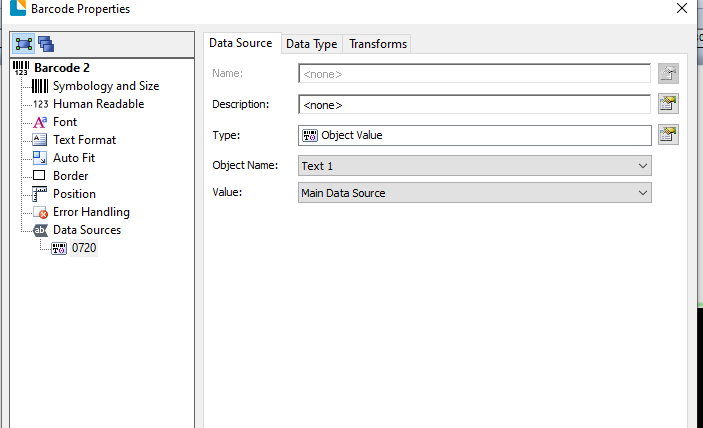
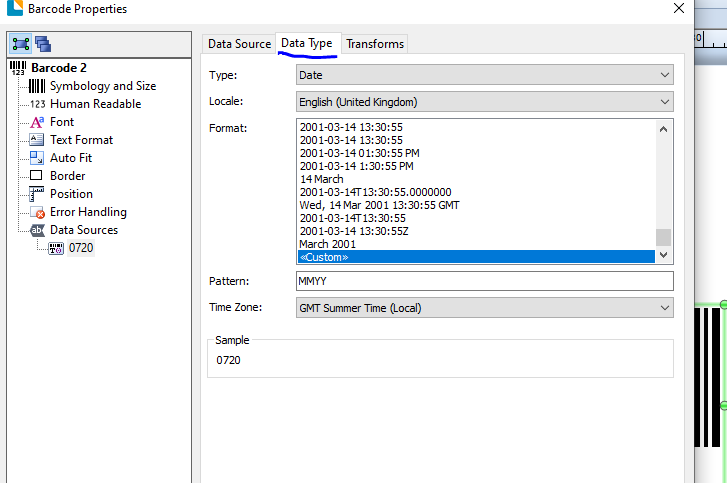
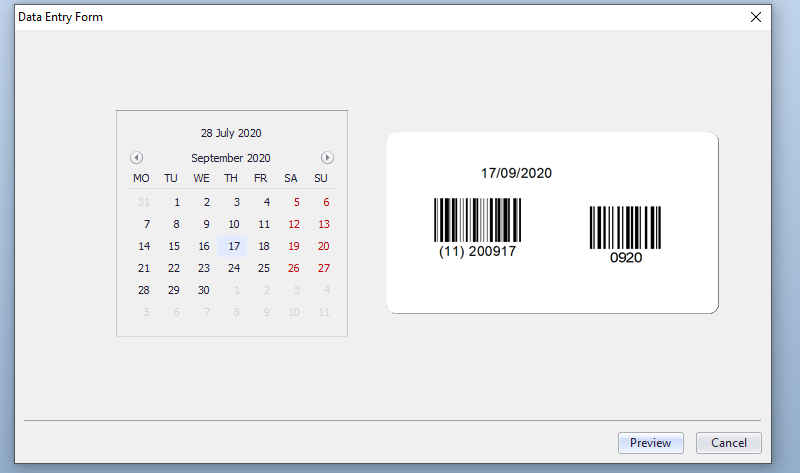
I have also linked the Text Date to a Month Calendar on a Data Entry Form and include a preview of the label on the form too. Both barcodes (the one on the left being a GS1-128 representing a Best Before Date) are connected to the text input which in turn is linked to Month Calendar as per the screenshot below:
 0
0


Bitte melden Sie sich an, um einen Kommentar zu hinterlassen.
Kommentare
6 Kommentare