Qr Code Needs Ucc/ean128 Check Digit

Hi, I'm printing a string of data exported from my ERP system (via flat file) that includes data identifiers and I have a new need for 2D symbology due to space constraints on the label.
When I print a linear code 128, I have the option (within Bartender) to select UCC/EAN-128 and the 'check digit' box is already checked. The software adds the check digit and my barcode is happy.
But I do not have the same provision for QR code. Is there a way to add it?
Example data string:
Raw:
01008838738709111150518172005152143094688
With check digit (16th char):
010088387387091411150518172005152143094688
Showing data identifiers and the check digit (the first 4 in the string):
(01)0088387387091 4 (11)150518 (17)200515 (21)43094688
Any help would be appreciated.
Oh- what version of Bartender you ask? V6.20.... I know, I know......
-Trevor
-

Shotaro Ito
★ BarTender Hero ★
I don't have much experience on BarTender V6.20 - thank you for using the BarTender long time.
In 10.1, you can create a GS1-128 barcode(Barcode 1), There's GS1 QR Code to support GS1 application identifier wizard.
Please try out with our 30-day trial version - I recon V6.20 won't run on recent OS so you need to upgrade to new version sooner.
0 -
The check digit you refer to is regarding the check digit of the Code 128 symbology, it's hidden and is not considered to be part of the barcode data. A QR code uses built in error correction (ECC) at the symbology level. There are also check digits for certain AI data in a GS1 formatted barcode, example for AI (01) for the 13 digit GTIN field, which is something separate from the symbology. If you use the wizard to create the barcode (used to be called EAN-128 in v6.20) then these check digits will be automatically generated for you.
0 -
Thanks for the response.
0 -
Hi guys, my business project leader just asked me to create a barcode label for some items, and it needs to be a "QR code with check digit". That is all the info I have. Glad you posted about this in 2015. I see Ian's comment above. Do QR codes commonly have a "check digit" option now in 2021? I am a process engineer. Used barcodes of all sorts for many years. First request for a check-digit ever. Don't want to let them down. Wish they had more specification info. The application is for medical sample test collection kits that will go to a medical lab for analysis.
0 -
Hi Dayna!
Thank you for reaching us in our Community Forums.
GS1 QR codes with check digits are indeed an option in 2021. However, setting up the code manually is not recommended as the QR code can be somewhat complex.
Because of this, BarTender introduced the <GS1 Application Identifier Source Wizard> feature which can automatically create the QR code along with the human-readable text: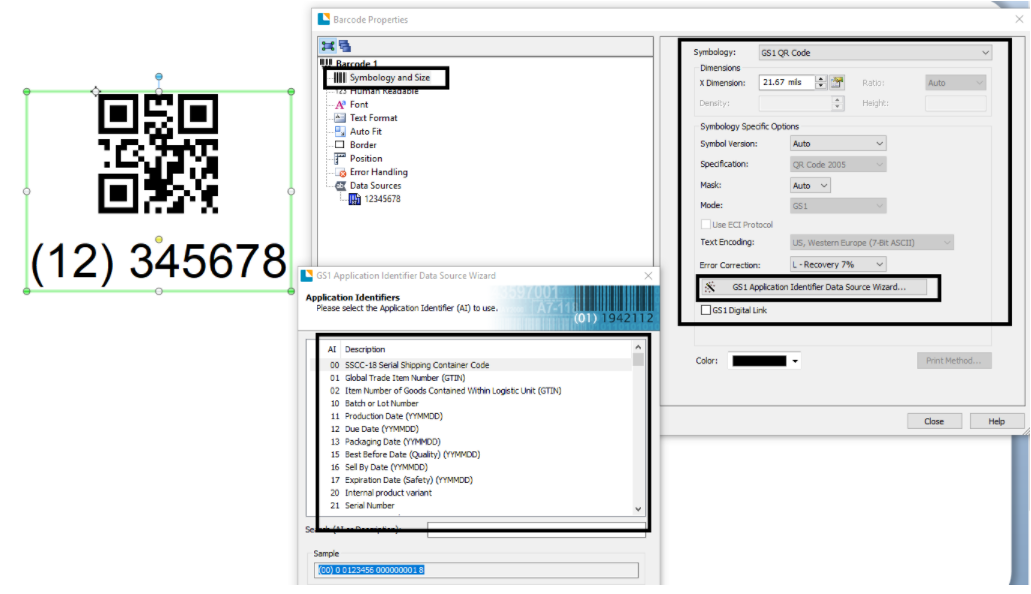
Basically, you add a GS1 QR Code to the template, edit the QR Code's properties, and assign the information (text) automatically.
We have a white paper on GS1 Application Identifiers which I believe you will find useful.
I hope this information helped.0 -
Dayna: BarTender supports check digits at the barcode symbology level, the barcode standard level (GS1), and at the custom bespoke implementation level (either by way of a built in function or by coding the algorithm from the ground up, so it depends on what type of check digit that you're referring to as to what my answer will be. In general, the Starter edition would be able to cover the symbology and standards based check digit like with GS1, while you'd need at least the Professional edition or higher in order to implement special custom bespoke check digits using VB Script.
QR Code makes use of fault tolerance as part of the symbology, so making use of a check digit is a bit redundant at the barcode readability level. However, there might well be an application specific reason as to why a supplemental check digit is required for your use case. You would need to know what type of check digit is needed and its algorithm used, precisely, in order to implement it though.
0


Bitte melden Sie sich an, um einen Kommentar zu hinterlassen.
Kommentare
6 Kommentare