Nutritional Data

Is anyone using Bartender for food labels? If so, how are you formatting the nutritional data information? Is there an app or add on that formats the information using FDA Labeling requirements?
Thank you.
-
When you install BarTender and choose to install the "Sample Documents" component, it will include some sample documents that we provide with BarTender. They are located in the C:\Users\<user account>\Documents\BarTender\BarTender Documents directory by default. In the Food Production and Processing folder within this location, there is a Nutrition sample label we have. You may modify the sample for your particular use and required specifications.
0 -
Dear Jasper Wen, or others....
When im am using a plain text i can sellect the font: Futura bold
This is a custom font, wich i installed in my windows font folder.
But when i use the wordproccesor, i cant select my Futura font.
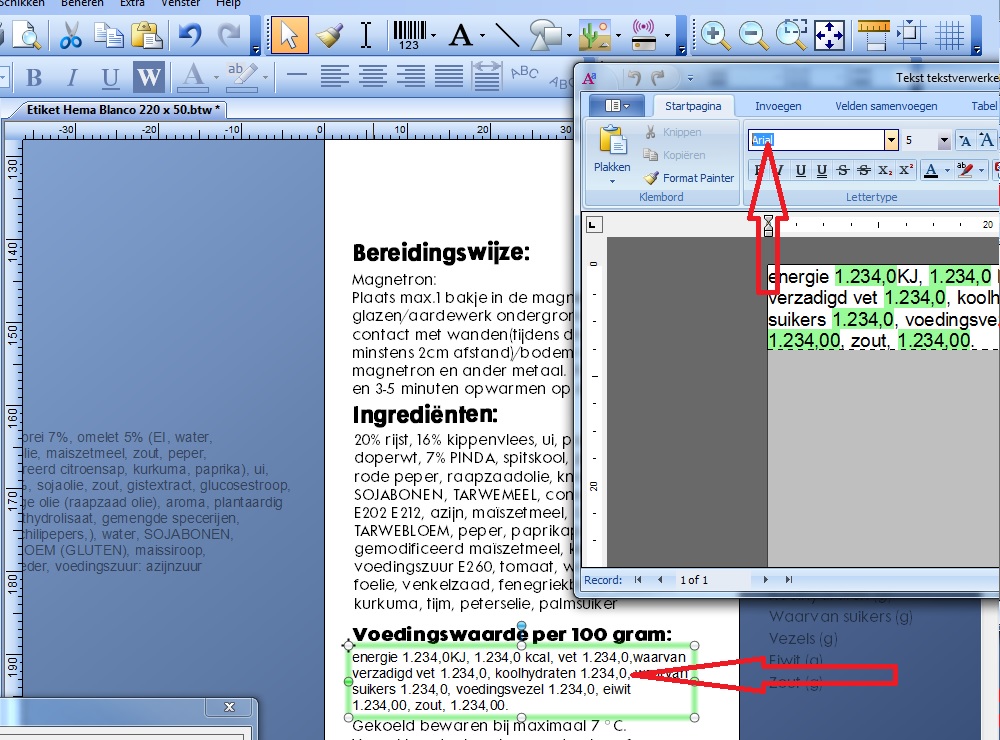
Im using the wordproccesor to declare nutricial values wich is a combination of normal text and database fields.
Does someone know what i am doing wrong?
Sorry spelling mistakes, I am Dutch :)
0 -
You should be able to select the same type of Windows true type fonts for both a regular text object and word processor object. I would suggest make sure you are on the latest service release for your version of BarTender and may try restarting BarTender or system.
If you are still running issues, please contact our tech support to open a support ticket.
0


Bitte melden Sie sich an, um einen Kommentar zu hinterlassen.
Kommentare
3 Kommentare