How To Split Data From One Data Source Into 2 Different Text Objects?

Hi! I am kinda new here. Been working with Bartender UltraLite for a while, but so far all the tasks were simple. Got text label, bind data source (text field of dropdown list), format the input if need, done.
But this one appeared a bit tricky...
1. I got a data source. It is a fixed values dropdown list. Each value goes like this: "NNN - Color_name_here", where NNN - three-digit code (for example, "002 - Yellow" or "017 - Dark blue").
2. I need to split this string in two parts: NNN and ColorName.
3. Then I need to print NNN inside one text object, and the ColorName - inside another one.
First I thought that I just bind the Data Source to both Text Objects, and just apply different prefixes/templates to format them ("???~%" to get 3-digit number from data, and "~?~?~?~?~?~?" to skip everything before ColorName). But it seems that I can bind my Dropdown List to only one object.
Then I tried to use Named Data Source. Ok, I can bind Named Data Source to both Text Objects, BUT all the required formatting applies to the Named Data Source, but not the Text Object, so I just end getting both Text Objects containing same data.
So far I found this workaround: I use unprintable Text Object, bind unformatted Data Source to it, and then bind it to my two Text Objects, and format each of them as I need.
Please advise me if there is more elegant way to split a string from one Data Source to 2 substrings and put them in different Text Objects?
-
A little late but I found a way to split it with a VBS Script.
We had a serial number to split into four different Barcode-Fields in the layout.
So we made a script into the "OnPrintJobStart"-Event in the Script Editor.
This script splitted our Serial Number, coming from a CSV-File as 123,321,213,221 into four different fields with Data Sources sn1, sn2, sn3 and sn4.
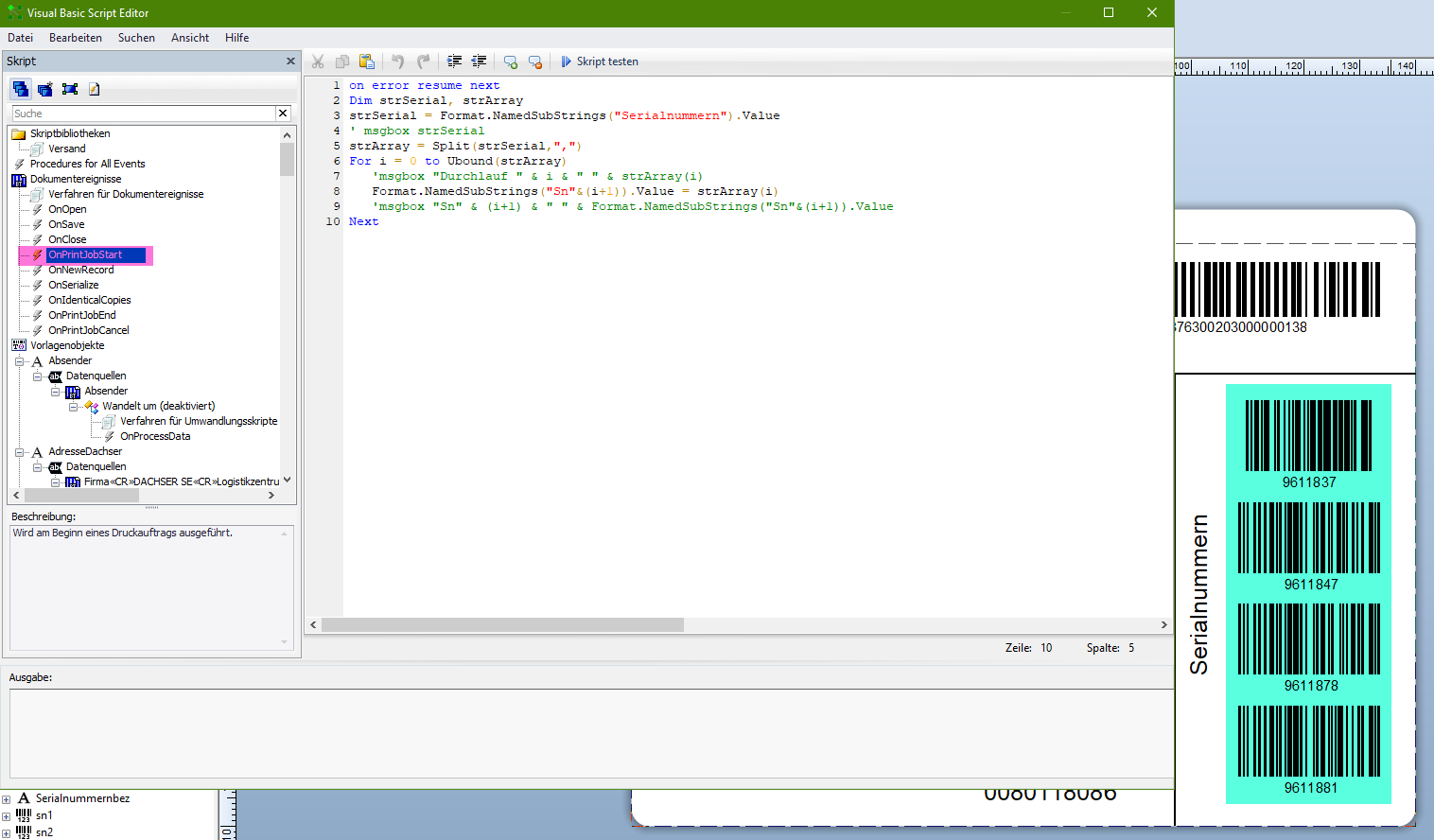
Here the script:
on error resume next
Dim strSerial, strArray
strSerial = Format.NamedSubStrings("Serialnummern").Value
' msgbox strSerial
strArray = Split(strSerial,",")
For i = 0 to Ubound(strArray)
'msgbox "Durchlauf " & i & " " & strArray(i)
Format.NamedSubStrings("Sn"&(i+1)).Value = strArray(i)
'msgbox "Sn" & (i+1) & " " & Format.NamedSubStrings("Sn"&(i+1)).Value
Next0

Bitte melden Sie sich an, um einen Kommentar zu hinterlassen.
Kommentare
1 Kommentar