Shift + Drag

It appears as if 10.1 SR2 has either removed or accidentally broken the ability to hold shift while I drag an object in order to lock it into the X/Y axis when re-positioning. Instead, it now overrides the "Lock to object or ruler" functionality.
This can be a pain if there are a lot of objects on the label that my field is trying to lock to while I'm moving it.
Further, if I hold Ctrl+Drag in order to make a copy of a field, if I try to align it correctly using the automatic snapping guides, when I release the mouse, the object "Jumps" and clearly does not land aligned.
This is hard to explain through text I know.
-
Did you note that you can snap to object/ruler or snap to grid? Are you sure you're using the appropriate option for what you want? To be honest I'm not sure what the problem is as all seems to function as I would expect for me.
0 -
Ian,
Create an object. Any object. I'll use a simple box for an example.
Now, we will use the shortcut to copy an object. This is Ctrl + MouseDrag. While I do this, I clearly see the alignment guides you speak of. Screenshot:
[attachment=696:AlignBoxes.JPG]
Now, release the mouse. This should drop the box in alignment with the first box based on the alignment guides. Observe the results. They are not aligned:
[attachment=697:AlignBoxes2.JPG]
This behavior does not appear to persist if I'm not copying the object (Ctrl + MouseDrag).
This was not an issue prior to SR2, as I could hold the SHIFT key in order to keep my object in alignment when making a copy.
I hope this makes more sense.
0 -
Okay, now I understand what you're saying and have reproduced the behaviour. I've reported it to my colleagues in development for their views on the matter. I'll get back to you shortly on their response.
0 -
This has now been logged as a bug ticket in our development system, and should therefore be addressed in our next release. Thank you for bringing it to our attention.
0 -
Program: BarTender Designer 2022 R5
License: Enterprise Edition (3 Printers)
Version: 11.3/197999 (64-bit)
OS: Windows 11 Pro x64 build 22000
hold control and drag merged when releasing in bartender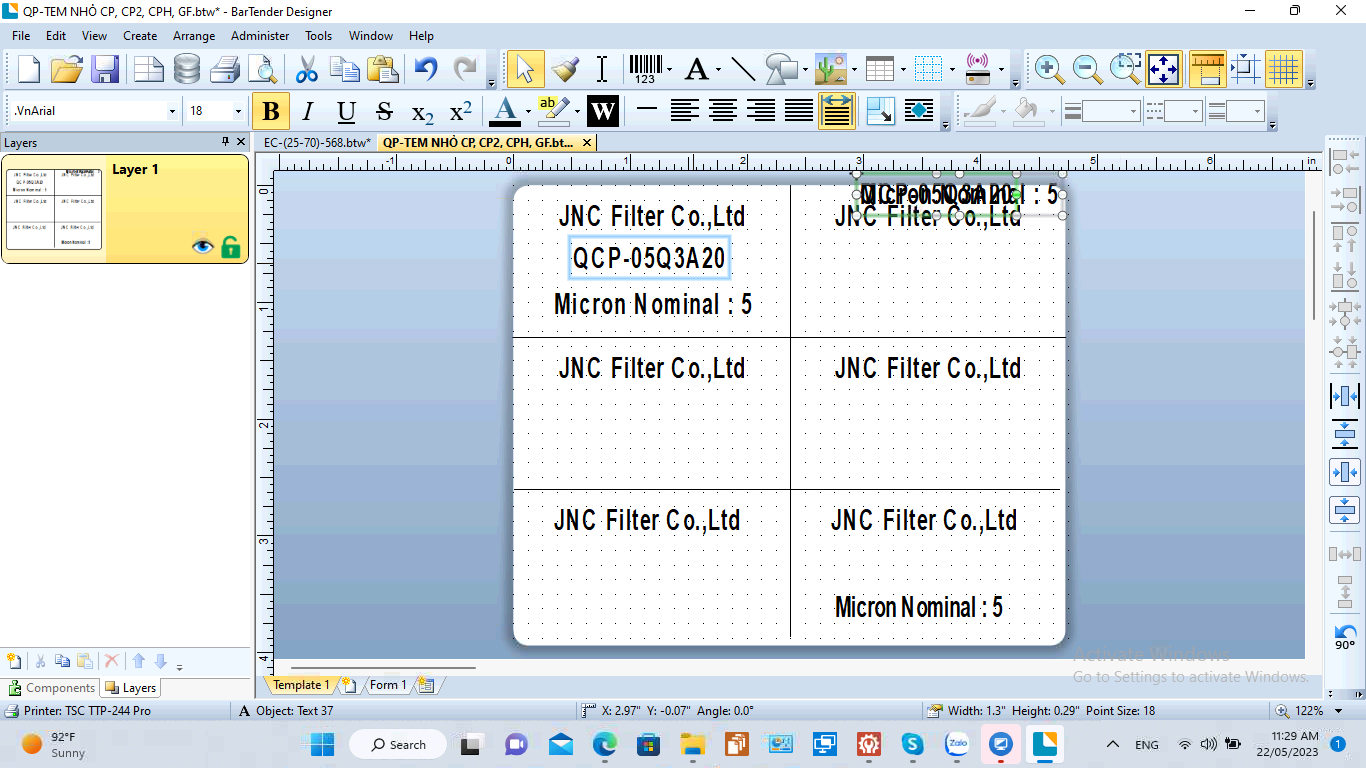 0
0 -
There is no need to hold the shift, just drag the mouse round the objects you want then release the mouse button and it will show your selection. If you want to deselect any of the selected fields then hold CTRL and click on the field(s) and the rest will remain selected, then drag those to the new position
0 -
No, I mean I hold down the Ctrl key when dragging the object
to get a copy of it but on the Bartender 2022 R5 when doing so the
object will shrink into a small line like the photo you see above.
This is an error and when I download the alternate 2021 it is no longer there.
🙋🏻♂️
Peter Thane0


Bitte melden Sie sich an, um einen Kommentar zu hinterlassen.
Kommentare
7 Kommentare