Maximum Of Objects / Layers In Design?

I am setting up a master design so that for specific groups of items from our ERP database different designs are created. Each group of items, mostly customer related, has its own label design.
These designs are created on layers, each design on its own layer. Layers are being printed dependant on settings from the item file.
This works fine currently, but as I am expanding this setup I wonder if Bartender has a limitation in the number of layers that can be used, or objects which can be defined? I might end up with a master file consisting of over 50 layers with hundreds of objects.
The reason I would like this setup is that the end user in de production environment only will use a print station and just will choose an item code and label quantity. The correct design will be defined in Bartender and the ERP system. There will be just one .btw file, so never a wrong label can be chosen by the end user.
Alex
-
Hi Ian,
Has there been any fix to Alex question on error code 3628 yet?
Thanks,
Paul-Tien
In the original design the VB code was spread out over multiple template pages. As Ian stated in another thread, there is no definite way to control the sequence of processing of the VB code. SInce the behaviour in later SR version was different, unexpected results occurred, such as this code stating 'nothing to print'.
Upon that answer from Ian, I have rewritten the VB code and put this on ONE specific template page. All the VB codes from the other pages was removed. This gives the user/programmer the option to control the VB code processing sequence. SInce this change, the design is usable in 10.1 SR1 to SR3 and in the latter SR the performance has increased as well.
I have not noticed SR4 was released already, but will test it in my local test environment.
Error code 3628 itself does not tell a lot, but one should take extra care in the design phase of these large multi-template designs. If one controls what happens, it will be more easily found why this error code is thrown, because you will know why nothing is printed.
From the eastern Netherlands, I send you all the best wishes for 2015! Happy printing!!
Alex
0 -
Here is an update to this old thread...
Well, some years have passed since this thread but we have been using the template setup described above all these years with great succes. Our current version of the template is version 55, so we have had some additions during the year. The template now contains 89 designs which are filled dynamically from the ERP system when the user selects the itemcode in the drop down list, or types it in manually.
We have grown out of our license of 10 printers however and since we were still running on 10.1 SR3 it was time we upgraded. Currently I am testing the design in Bartender 2021 version 7 and there is a compatiblity issue.
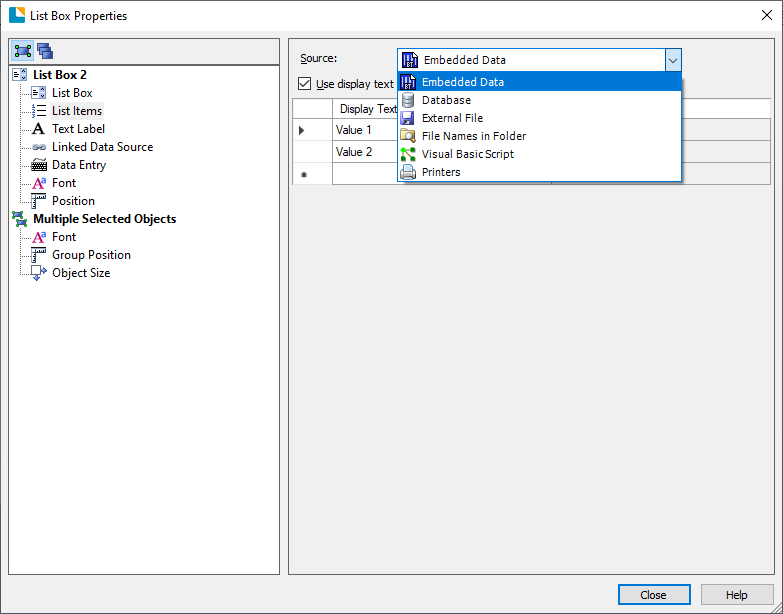
In the listbox, I use an 'OnFill' VBscript which creates the list of item codes so the user can select one on printing. In this VBscipt I used the follwoing setup:
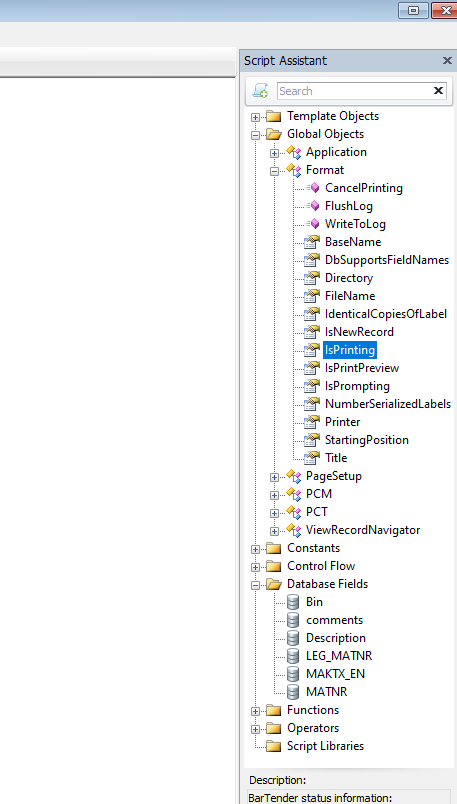
If Format.IsPrinting Or Format.IsPrintPreview Then
....code for creating the list....
End If
It seems that in Bartender version 2021 the 'Format.IsPrinting' and 'Format.IsPrintPreview' are not working anymore. The if-then statement above always returngs false so the list was never created. I have now removed the condition and the list is created again, but the disadvantage is that the list seems to be constantly created on the background when editiing the template file in Bartender Designer. This delays the handling of the file, one has to wait for screens to appear, especially the data entry form which can take over 10 minutes to display.
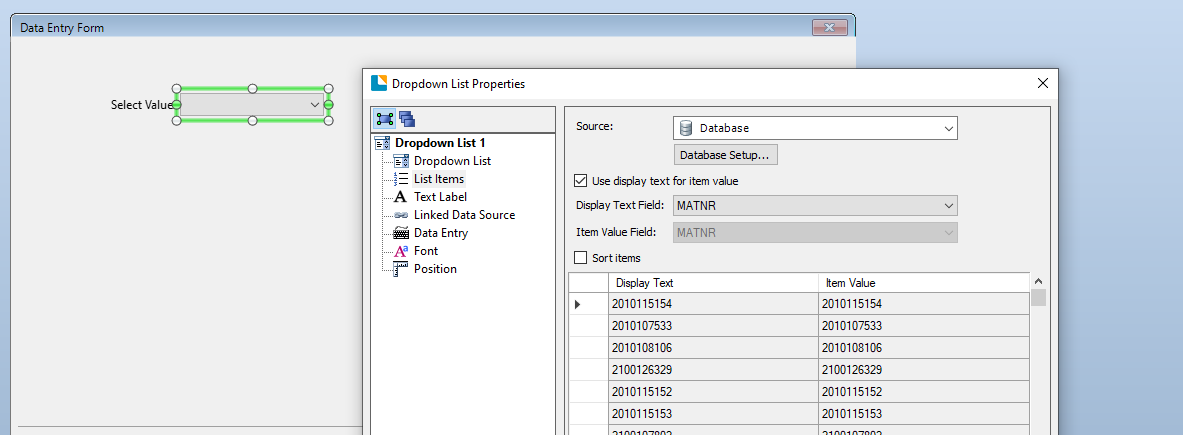
I have changed the retieval of the item code list from VBscript to database with SQL code but the performance for the end user suffers from this. In Bartender Designer the handling is a bit faster, but the waiting time in Print Station for the end user is more.
Is there a replacement statement for 'Format.IsPrinting' and 'Format.IsPrintPreview'?
And are there some other incompatibilities known in the way how Bartender 2021 handles VBscript in comparsion with 10.1 SR3?
Regards,
Alex Buurlage
DEC BV - IT Department
0 -
Those commands are still present in 2021
If you are just pulling a list from a database for the users to select a record from, couldn't you just create a filter in your database connection and then add a dropdown list on your Data Entry Form connected to the database and then use the Linked Data Source option to connect this upto to your database query/filter.
If using an SQL connection then I would suggest that you configure the database link to use a user a account with full administration rights (such as the "sa" user).
0 -
I'm running this on BarTender 2022 preview 2 and find that this is still working as expected. I'm pretty sure it was working back when I was running BarTender 2021. I would suspect that there is something specific about your document design that is causing it to function differently than expected. Is anyone else out there running BT2021 also getting this problem?
Perhaps Alex, you could try creating a simple label that uses such a VB script to see if you can reproduce the issue and share either here or with technical support.
0 -
Hello Ian,
Just now I did manage to create two sample files:
List Box sample 1.btw
List Box sample 2.btw
If you open the sample files, hit the 'print' button and then 'preview', you will note the difference. Just dig into the listbox VBscript properties of both files and note the difference where the if-then statements are commented out.
But, how do I attach the sample files into this community thread?
Regards,
Alex
0 -
I don't admin the Community forum myself, but I would imagine you should upload and share the files from your cloud based file storage system of choice, share the files, and then insert the link in your reply.
0 -
ok, no problem Ian.
In order to make it easy 'downloadable' I have put both .btw files in a zip file which can be found here:
https://www.decinternational.com/temp/samples.zip
Please ring a bell as soon as you downloaded them. I will remove the files from our website.
0 -
Okay, I have your document files and can see wat you're saying. I did try adding the Format.IsPrompting to the conditional If...Then statement, but it had no effect in this case.
However, to echo a prior comment, why would you not use one of the other data sourcing options to fill the list, as opposed to VB script, which was there to provide a dynamic list option when we at the time didn't support other options?
 0
0 -
Hi Ian,
Yes, direct SQL database access works as a second choice, but as I mentioned in last Friday's first post the performance for the end user is less than when working with VBscript. I must say this wonders me since one would expect that SQL versus VBscript would be strongly in favour of SQL.
In Bartender Designer the performance is similar but for the end user using Print Station (and some less heavy hardware) the list-fill takes much longer with direct database access. By the way, the SQL server is not the issue here as I know what it can do in other situations :)
My main question in Friday's post however was if there are more known issues with VBscript handling from 2021 versus 10.1. I have upgraded some stand alone stations, one having the old 'commander' automation system which has now been replaced by 'Integration' and that works fine, but I am approaching the moment where we will upgrade Bartender on our Remote Desktop Servers which are used on multiple production sites and I would like the transition to go as smooth as possible.
Alex
0 -
To debug the SQL Server performance issue, I suggest you contact technical support.
In terms of the VB Scriptiing issue of the IsPrinting and IsPrintPreview properties. After a bit of testing, it seems like the OnFillList VB script only actually runs at design time to populate the list. It does not run during the prompting and print/preview process. A method I used to prove this was to add the current time as a list item. I used the following expression for this: FormatDateTime(Time, 3)
When printing/previewing the time value in the list remained unchanged, even when the conditional If...Then statement was removed.
I will ask our development team if this is the expected/desired behaviour.
0 -
Hi Ian,
Thanks for the answer. I have further investigated the performance differences between 10.1SR3 and 2021R6
During the years I have gathered a lot of experience in Bartender software and would consider our print files as created by power users. We are really pushing the software to the limits, I know.
In order to test only the performance of the software, I removed any SQL database connection as well as all vbscript code. These are my results:
Print station, starting print job to data entry screen:
10.1SR3 - 15 secs
2021R6 - 5 secsPrinting after data entry:
10.1SR3 - 16 secs
2021R6 - 4 secsSo far ok, but now the difficult part:
In Bartender / Bartender Designer, open list box control properties of large list box on data entry form:
10.1SR3 - 5 secs
2021R6 - 7 minutes and 52 secondsIt seems that our template can be used in production in 2021R6 without any extra delays, but when we need to do maintenance on the template file, just opening properties of a field can take up to 8 minutes.
During this time, high CPU usage and 'not responding' is displayed in task manager and I have no idea what the program is doing. But after waiting that time, at the end the program does continue into the requested screen.
Maybe, if you still have a 10.1 environment around would you like to check the templates in both versions? As there are customer names on the tabs, I would not like to make it downloadable for everyone, if I can send it per attachment to an email address or upload it to customer FTP area at Seagull it would be great. It's a zip file of just over 6 MB.
Alex
0 -
Alex: I think you will be best served by starting an official Technical Support request with our support team as they will be able to handle, examine, and diagnose your complex and private document design in a confidential manner. Myself, I am not part of Technical Support, so I mostly won't be involved, although they might consult with me. Contact Technical Support via this link: https://support.seagullscientific.com/hc/en-us/requests/new
Yes, I imagine the complexity of your label design is indeed pushing the limits, and that for the form control in question the code path goes into a bit of a loop for a while. We probably need to optimize something in the BarTender code to prevent this. Generally such lack of optimization will not be noticeable, but your particular document reveals the flaw. Ultimately I would anticipate us needing to make a bug fix to solve this one, but maybe you're doing something sub-optimal that could be corrected.
0 -
Thanks Ian,
I will open a support request.
In the meantime I think we will upgrade the 10.1 version to 2021 on our production servers and do the maintenance of the big template file on a seperate Bartender installation PC running on 10.1. Printing with Print Station can be done on the production servers in version 2021 with no performance loss.
Yesterday I also upgraded from 2021R6 to 2021R8 but that not made a change.
Ciao,
Alex
0


Bitte melden Sie sich an, um einen Kommentar zu hinterlassen.
Kommentare
43 Kommentare