Printing Roll Numbers

I have just switched over from Labelview to Bartender and trying to learn the ropes.
Here is what I am trying to do. We use the label software to print out information for every roll good we sell.
I have setup a label where the operator will enter specific information such as part number, color, and roll number. The first two are simple, for the roll number I am struggling. I want the prompt to say Starting roll number and Ending roll number. for example, the operator will enter roll 10 as starting and roll 80 as ending. Bartender will then print labels with roll number 10 through 80 (80 individual labels with individual roll numbers).
Labelview has a rollcount() or Rolladd() funtion that made this easy. I'm sure Bartender does as well but not sure how to start. Any ideas would be great.
-
Hello,
I've added a BarTender sample document for you to examine.
At print time, you will be asked to enter the start roll and end roll number (e.g. 10 and 80). After this, you will see that the first label to be printed will show 10, and each next label will be serialized until you reach the end roll number.
On the BarTender document, out of the label design, you will see two text objects. These objects contain the start and end for the serial number range. These two objects have been shared so they can be referenced by other objects / features in BarTender, such as the total number of serial numbers to be printed, which is configured via the "File > Print" dialog, and now by pushing on the button next to "Serial Numbers". I've data sourced the "Serial Numbers" with a VBScript:
value = Format.NamedSubStrings("mystop").Value - Format.NamedSubStrings("mystart").Value + 1
This is the total number of labels which will be printed (I add +1 to the range so that the Start (e.g. 10) and End Roll number (e.g. 80) also appear on the labels).
The main object on the label design also uses a simple event based VBScript to serialize the roll numbers. You can modify this sample for your own use.0 -
Has anyone used VB Script to print 1 of N on labels? This is important for shipping. We usually know the number of cartons before printing so that value could be entered on the data entry form.
0 -
You don't really need to use VB script to print X of Y labels. You basically need to do the following:
1. Create three data sources, one for the X value, one for the " of " value and the last one for the Y value.
2. Serialize the X value.
3. Related the Y value to the number of serialized copies you will be printing. To do that you'll need to have the serialization dependent on a data source, name that data source and share that named data source with the Y value (you can then set its value through a Data Entry Form for example).
0 -
I am new to the forum and have a similar question / issue when I am trying to setup a label to print x of y. I have a label that is going to have 3 fields. Date / Description and quantity count, the issue that I am having is that every print job requires 2 label per each serial count. For example if I am setting to print 1-10 labels, I would need 20 labels that would start of 1 of 1, 1 of 1, 2 of 2, 2 of 2 etc.
I have tried to setup new labels, serialize individually, tried to turn on the functions with printing properties but cannot seem to get 2 labels per serialized sequence?
0 -
Make sure that you're using both the 'serial numbers' and 'copies of serial number'. If you specify, for instance, 10 serial numbers and 2 copies of serial number, you should get 2 copies each of 10 serialized labels. 0 -
Could I please have a copy of the file that Domingo Rodriguez refers to please.
0 -
Hello Stuart,
I believe the original BarTender document was never posted on the original forum question.
Why would you require that BarTender document? X of Y types of labels no longer require a special document, as they are available as a sample component. These sample components are installed when BarTender installs.
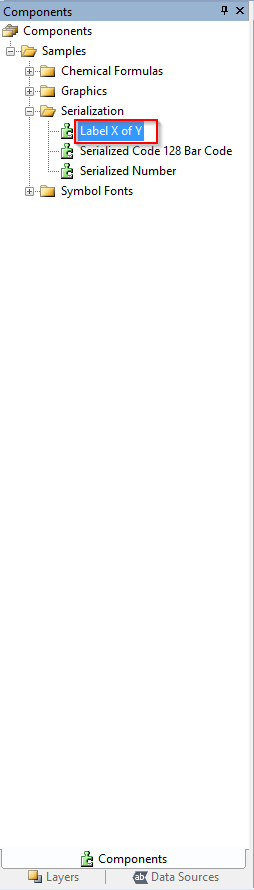
Also see Creating and Using Components
Hope this helps.
0 -
I have reinstalled and I can now see the examples. I will try these tomorrow as I have a meeting for the rest of the day.
Thank you.
0 -
It worked thank you for your help.
0


Bitte melden Sie sich an, um einen Kommentar zu hinterlassen.
Kommentare
9 Kommentare