Data Entry form

I've created a label template. Click the print button and select the record (attached Excel file). The part number and description are selected and print with the barcode perfectly.
Trying to make this as user-friendly as I can, I created a data entry form with the part number (linked to part number in the database) and quantity to print. When I input the part number and test the preview, the part number is correct, but the part description does not match the part number I input.
thanks for the help.
-
Did you create a Filter in the Database Connection Setup for the part number selection (setting the Queried Records on the File>Print screen to all) and then link the Part Number Data Entry box to the filter and not the label field?
0 -
I don't see the filter in the text input box properties. The filter showed only to create a query prompt. That shows up in the text input box properties. It works, sort of. If I open the .btw file created, it immediately prompts for the part number, then opens the form and prompts for the part number and quantity again.
0 -
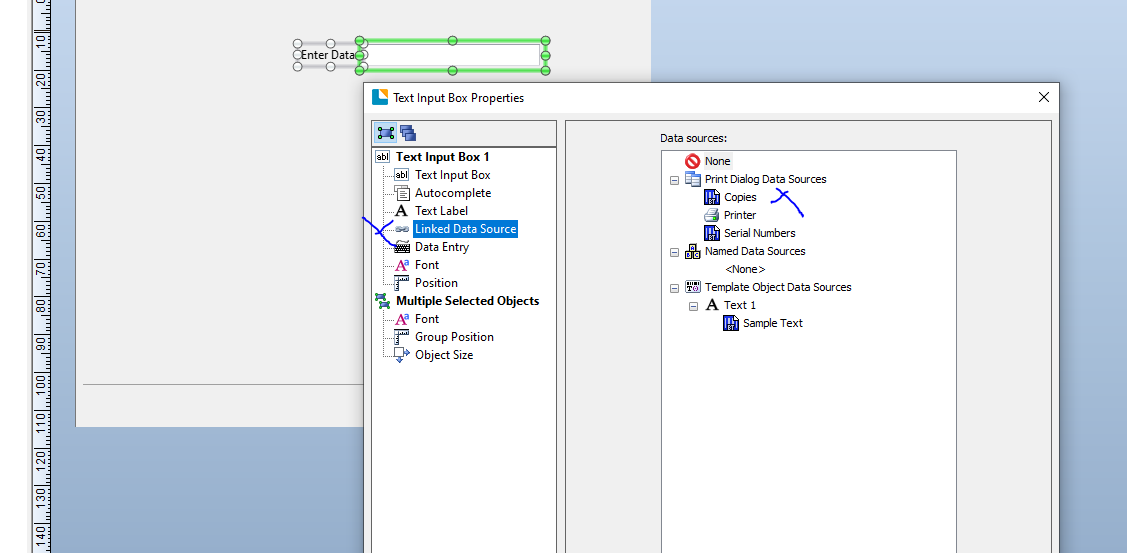
Yes, add the input box on the form and having clicked on the Linked Data Source option in the column on the left a new screen on the right click on Copies (or Serial Numbers if you have enabled a sequential number field on your label) to link the input to number of labels option
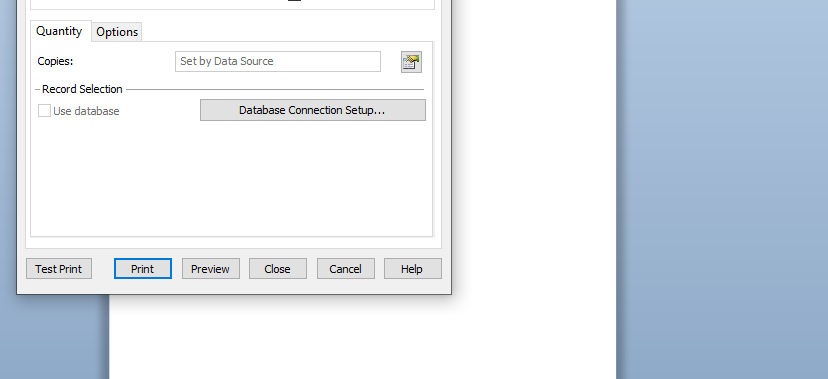
On the File > Print screen the Copies (or Serial Numbers) box will now be greyed out to show that this value comes from elsewhere at print time.
 0
0

Bitte melden Sie sich an, um einen Kommentar zu hinterlassen.
Kommentare
3 Kommentare