Assign Bartender Variable to Results of SQL Query

In Bartender, in a form, I'm running a SQL query to return a list of part numbers that are specific to a particular customer into a list box. The query is below. In addition to the part numbers, it also selects other pertinent data for that part. The user then picks the desired part number from the list box so that a label can be printed. I would like to print barcodes that reflect the data in [CustXPrt_XPartNum], [PartRev_RevisionNum], [Part_PartDescription], [Part_PartsPerContainer], [Part_PartNum] on the label but I am not sure how to assign those values to their respective objects on the label. Can someone help me, please?
Thanks in advance.
Ernie
select
[CustXPrt].[XPartNum] as [CustXPrt_XPartNum],
[PartRev].[RevisionNum] as [PartRev_RevisionNum],
[Part].[PartDescription] as [Part_PartDescription],
[Part].[PartsPerContainer] as [Part_PartsPerContainer],
[Part].[PartNum] as [Part_PartNum]
from Erp.Customer as Customer
inner join Erp.CustXPrt as CustXPrt on
Customer.Company = CustXPrt.Company
and Customer.CustNum = CustXPrt.CustNum
inner join Erp.Part as Part on
CustXPrt.Company = Part.Company
and CustXPrt.PartNum = Part.PartNum
inner join Erp.PartRev as PartRev on
Part.Company = PartRev.Company
and Part.PartNum = PartRev.PartNum
where (Customer.CustID = 'Taco')
-
Have you tried using the Database Connection Setup and create your joins and filters in there? This will create an SQL statement but you can edit this if you still need to to make a custom statement.
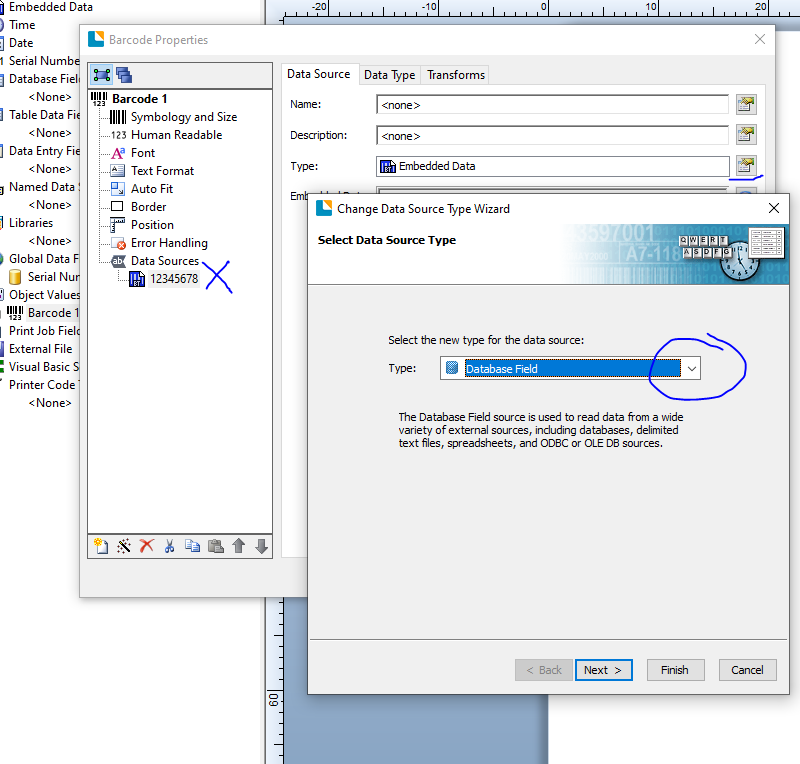
Using this option will mean the fields become available/selectable Data Sources.
 0
0 -
Peter:
Thank you very much for responding. I have set up a single database connection in my label. All of the data that I need is in the query in there. I guess I don't understand how the database fields then become available as a data source.
0 -
No worries. You can also access them from here too
 0
0

Bitte melden Sie sich an, um einen Kommentar zu hinterlassen.
Kommentare
3 Kommentare