Bad quality when exporting

Hi everyone
This issue is driving me nuts and i just can find a solution.
I have made a label inside bartender and the label looks fine and when i print it directly from the program it looks just fine. BUT when i try to export the label using Shift + CRTL + E the label quality is aweful, very pixelated and uneven. It does this no matter which type of file i chose (pdf, jpg, png ect.). The result is different from file type to file type but the result is always really bad. Does anyone know a solution to this? i have exported labels before this way with no problem.
Sidenote: i am using the 2016 version but i tried to download a trial of 2021 and it was the exact same issue.
-
This could be a resolution issue, if you use the normal Export image route rather than the Quite Export, then you can adjust the resolution of the image being exported and so you could see of that has any impact.
Alternatively, and assuming you have enough free printer licences, you could print via a PDF driver and create the image that way. 2021 should include a PDF printer driver as part of the install (although this maybe disabled in the Trial edition) and with the latest version of 2022 (R5) the PDF printer licencing has changed and so you can print X number of PDF labels per every 7 days for each physical printer licence you have (5000 I think is).
0 -
OMG how stupid am i!
I had seen the resolution menu and it was on 209dpi which it defines as "printer". Im a graphic designer and 150dpi usually is fine for print when doing graphic design but i guess its not at all enough for labels. If i bump the dpi up to 1500dpi its starts to look fine. Dont know why it has to be this high but it solved the issue so thank you a lot! :D
0 -
My guess is your default printer for Windows is a lot higher resolution than the printer in use in BarTender.
0 -
I noticed from the teaching video that one file can have multiple templates. Then there is also possible to just press print once and the printed copy of different templates can be anything number different from 1. I don't know how it can be done. Can someone help me?
0 -
You cannot do this directly but if there is a variable or if it follows a set pattern then it could be possible.
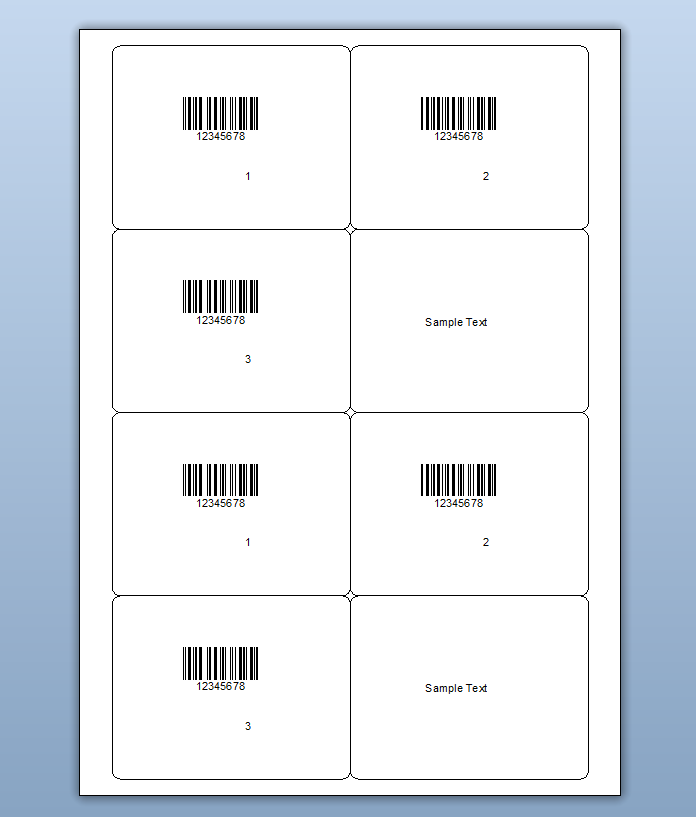
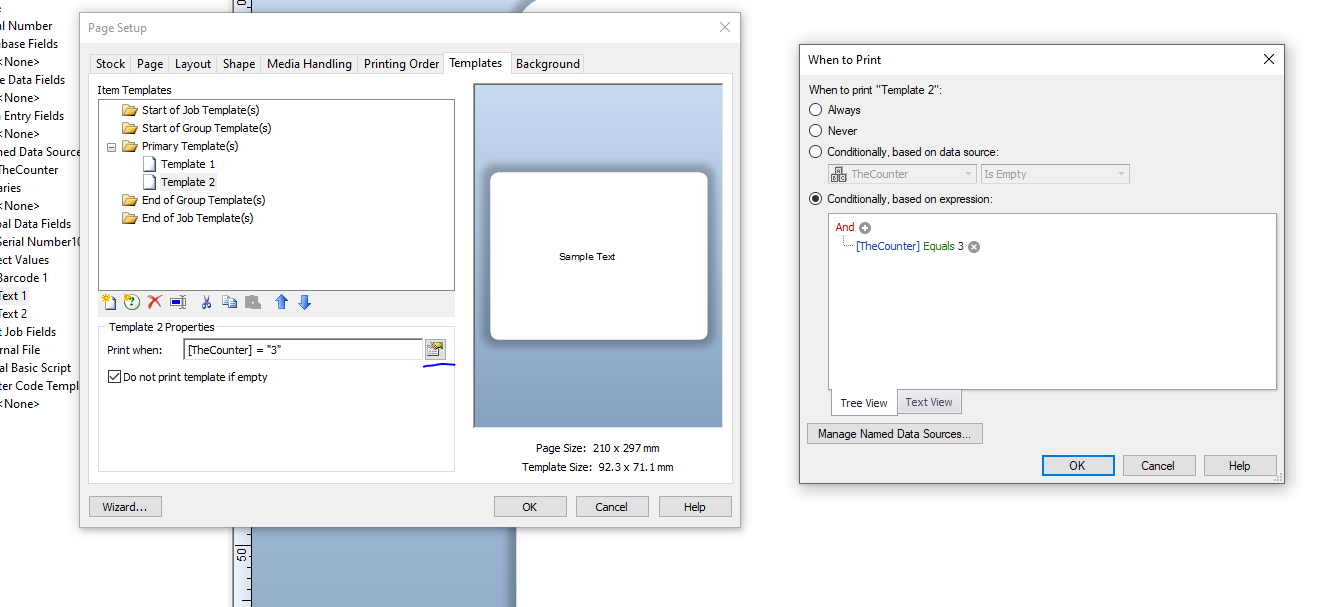
In the images below I have added a Named Data Source that increments and everytime it gets to 3 it resets to 1 and Template 2 prints. To do this I have configured the Print When settings for that template to suit.
 0
0 -
Norman please create your own thread for this question instead of using mine. I will get notifications for all your comments that has nothing to do with my initial question :)
0


Bitte melden Sie sich an, um einen Kommentar zu hinterlassen.
Kommentare
6 Kommentare