Printing mismatch with print preview

Hello everyone,
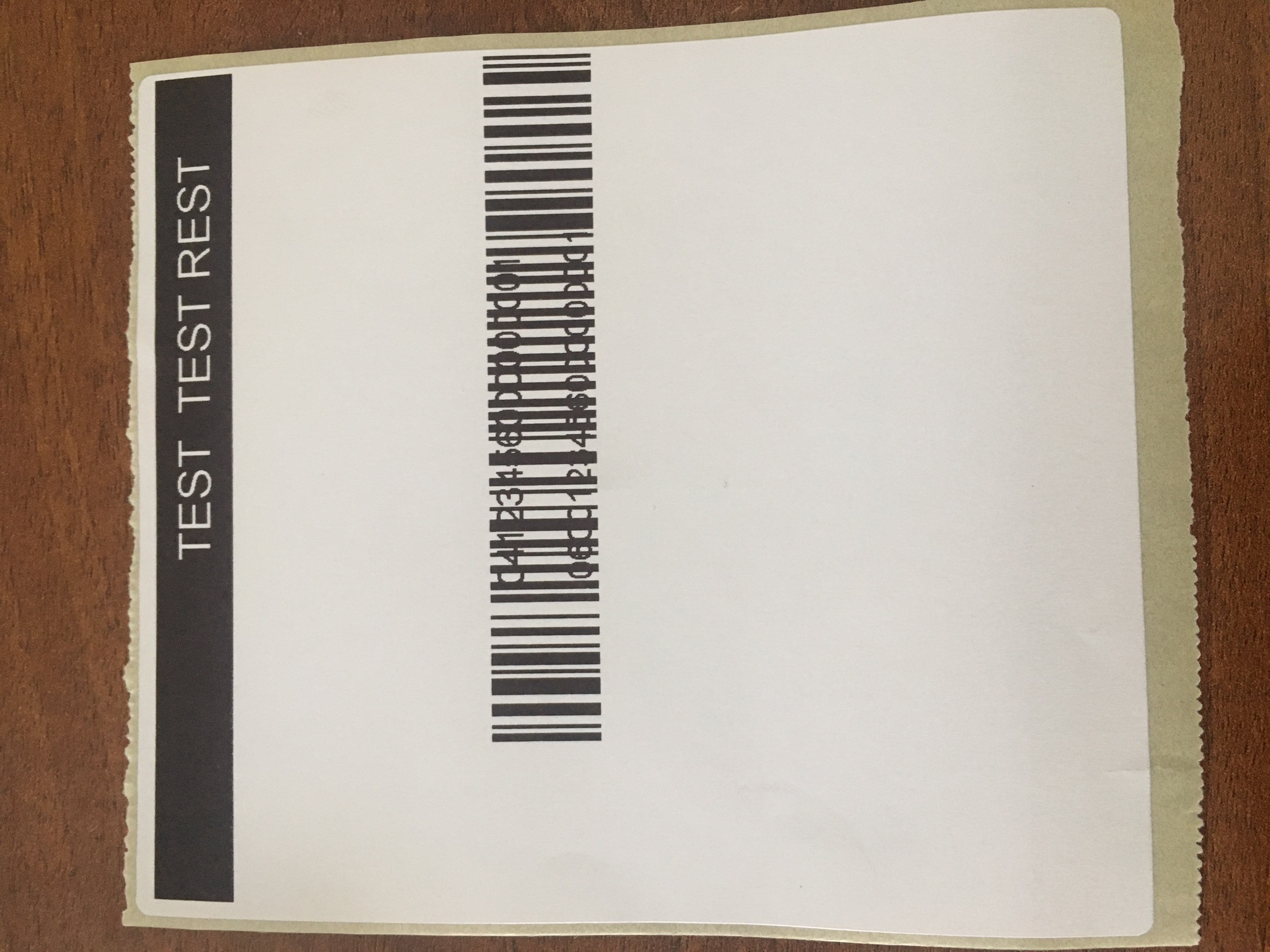
I am new in Bartender labeling design and printing and I am facing strange problem- what I see in print preview, is not the same as printed. I am using Bartender Designer 2016 R3 with printer GoDEX DT4x. The problem is that I am trying to put the human readable data behind the Barcode, but when I print it, the barcode is over the digits. Also I have a field with solid color- I made it with Rectangle, and over that field there has to be a Logo (picture), but in printed label the logo is not visible.The link below is with the .btw file and a picture of printed label:
https://www.dropbox.com/sh/uhfdp2tivlhxmwk/AADHfwNLP10lXhQl1kFUSJAia?dl=0
I suppose it is some setting that I have to change, but two days I can't find it, so I will be thankful if someone can give me some help
https://www.dropbox.com/sh/uhfdp2tivlhxmwk/AADHfwNLP10lXhQl1kFUSJAia?dl=0
-
Just to correct myself- I want to put the human readable data over the barcode with white background, but when I print it, the barcode is over the digits
0 -
Hi Veselin,
For the barcode issue, I would suggest turning off the human readable option in the barcode and placing a single line text box containing that number over the top of the barcode. You would want to set the background color (under the font option in the text box properties) to white instead of none.
For both this and the image issue I would suggest right clicking on the object and selecting "Arrange->Order->Bring to Front" to make sure that the image you want on top isn't accidentally getting set behind the other object.
0 -
Тhanks for your reply, James
For the barcode issue, I already try with additional Single line text box over the barcode. I even set the background color to white and I have the same result: in print preview everything looks fine but when I print the label, the barcode is over the digits (as over the human readable data as over single line text box)
Also I set both image and text box "Bring to front" but I have no positive result- the image is not visible, also the barcode is over the human readable data and over the single line text box. The problem is that in print preview everything is OK, but in real print I have these problems.
1 -
I have the same problem! did you know how to fix it?
0


Bitte melden Sie sich an, um einen Kommentar zu hinterlassen.
Kommentare
4 Kommentare