Using query prompt value for VBscript and printer setup

We would like to use Bartender for some automation, but with the current setting it seems to be impossible for us.
Example: There is a form where the user has to input the article number and quantity. Due to database connection, the quantity of articles in one carton is known. But how to calculate the quantity of needed cartons (and therefore carton-labels). We can't find any setting how to use the value of the quantity prompt within a VBscript.
In the second step, the calculated quantity of carton labels should be the number of copies of the label. Ok, maybe we could assign a named data source, but how to do this if there is no possibility to calculate with the user's input value?
Thanks in advance.
P.S.: Sorry fo any mistakes or bad expressions, but English is not my mother-tongue :-)
-
Hi Marco, were you able to solve this? i know its been a while but i have the same issue as you and i am not sure how to fix it
0 -
If I am reading this correctly:
Number of items per carton taken from a database field
Total number of items required taken from a Data Entry Form
Labels to print to be calculated from those two fields.
To do this:
- Add a field to the side of your label (so it wont print) and give this a Name via the Change Data Source Name button in the field properties, I called mine "TotalOrder"
- On your Data Entry Form link your data entry field for the total number of items required to this "TotalOrder" field (using the LInked Data Source option in the properties of the entry box)
- Back on the Template view add another field similar to the above, again off the side of the label, but make this field a Visual Basic Script field having given it a suitable name, as above, I used "CalcValue"
- Amend the VB type to Event Controlled Script and use the Editor to amend this.
- In the Autoselected Event change the entry to "Value = 1" and then click on the OnPostPrompt option
- In the entry field add the following:
Value = <double click on the TotalOrder named DataSource in the Script Assistant box to the right> / <double click on the name of the Database field that contains the carton quantity again in the Script Assistant box>
Value = Round(Value+.499)
So you should end up with something like

7. Click on File>Print screen and click on the button to the right of the Copies entry box and on the new screen change the option to Get Quantity from Data Source. Click on Data Source in the column on the right and then use the Change Data Source Name button and from the list of Named data sources choose the name you gave for the VB field and you should have something like the image below

...and that should be it
I hope this helps
0 -
Peter Thane
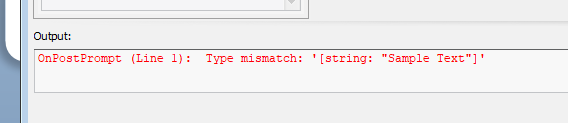
I encounter this error when I try to do it your way, any ideas?
 0
0 -
Do you get the error when you try to print or just on the screen? I think it could be the latter as your fields have a base text not numeric value (ie the VB cannot divide "Sample Text" as it is not a number) whilst when you print I assume these values will be numeric
0 -
Peter Thane Hi, yes you are correct. I did figure it out on Friday shortly after.
Thanks for the response Nonetheless.
0


Bitte melden Sie sich an, um einen Kommentar zu hinterlassen.
Kommentare
5 Kommentare